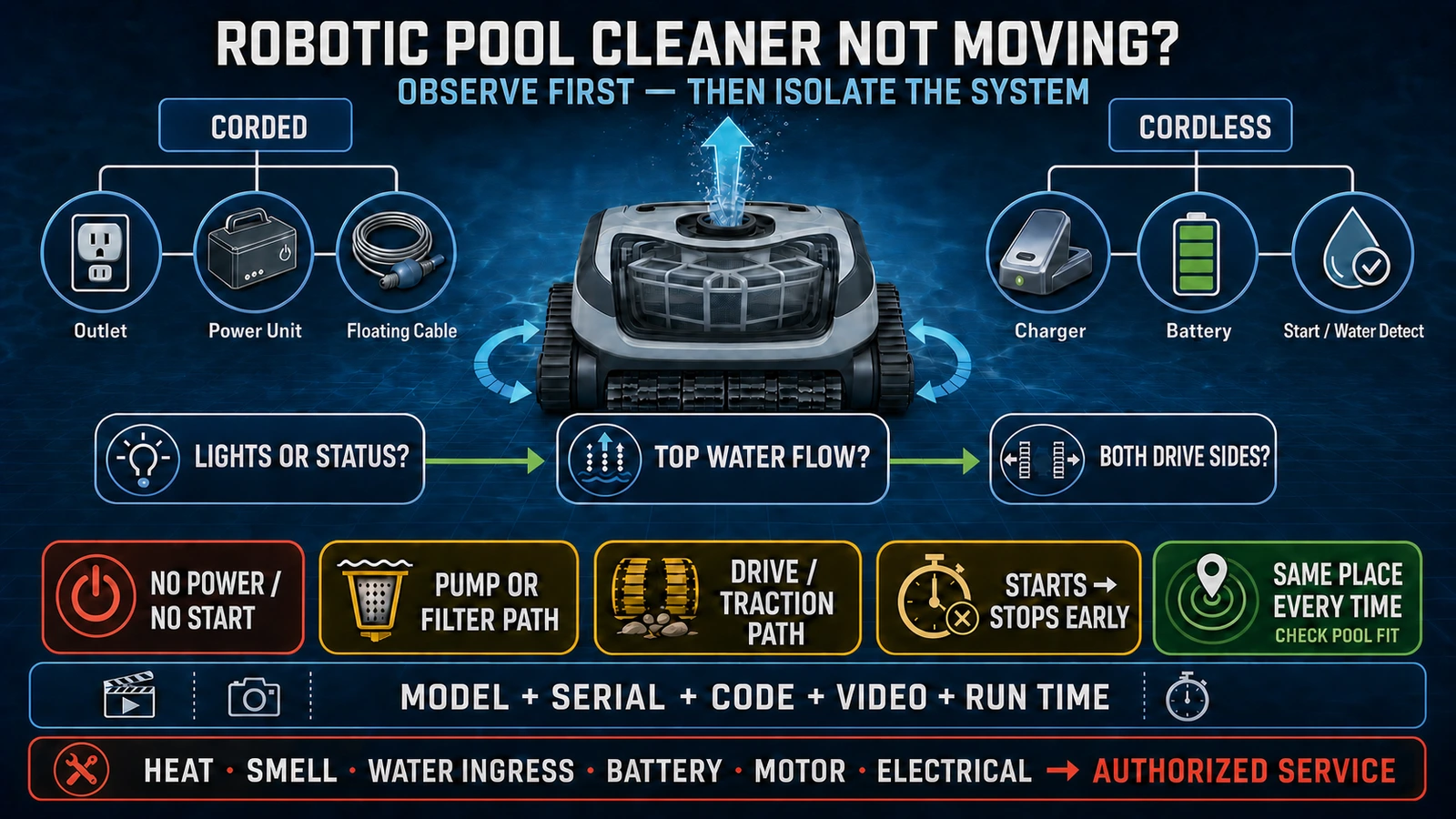
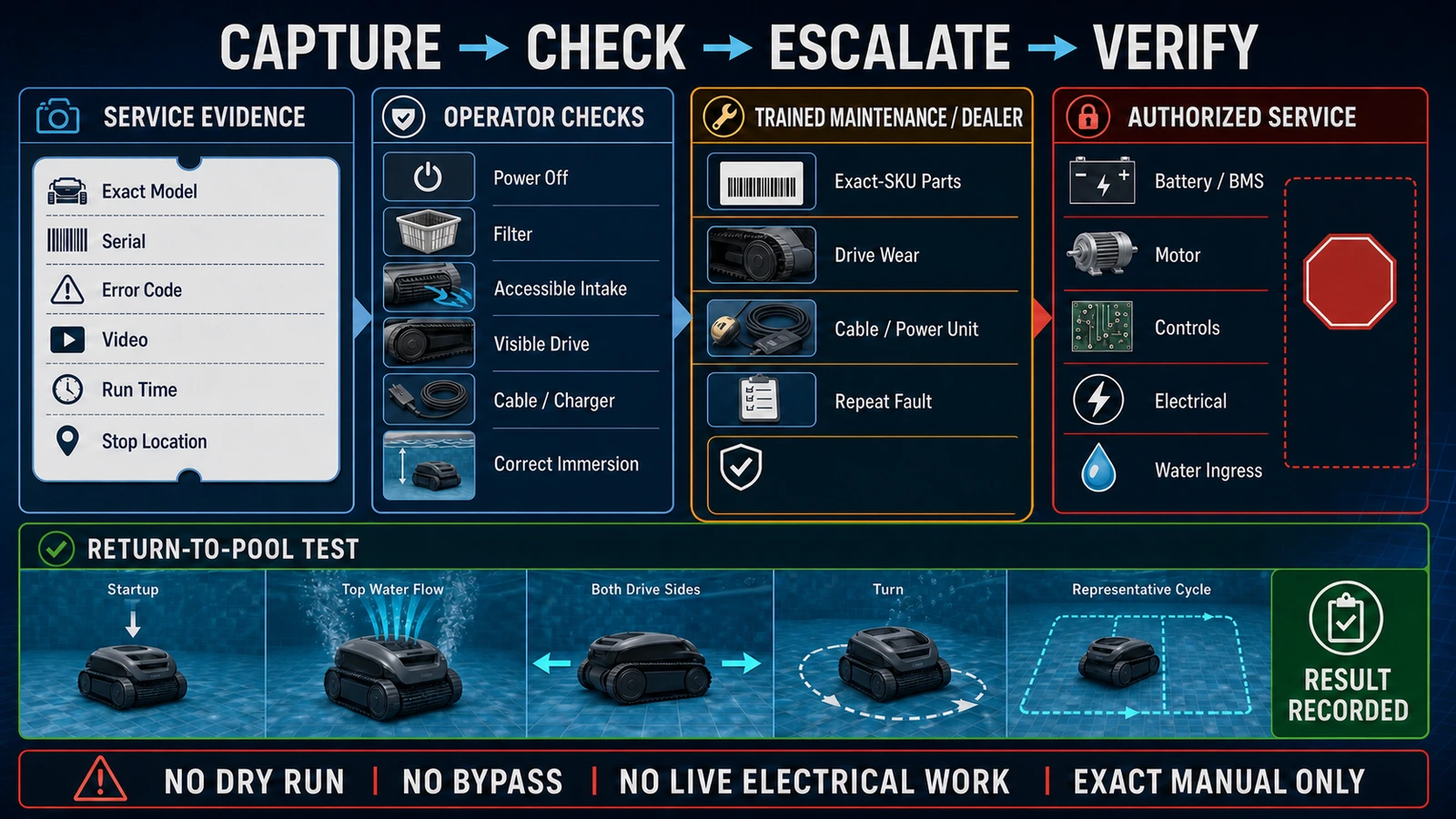
- Observe lights, top water flow, both drive sides, stopping time and stopping location before assuming that a motor has failed.
- Separate corded and cordless power paths, and perform only the external checks allowed by the exact model manual.
- Record the model, serial number, code, video and run time; escalate battery, motor, electrical and water-ingress faults to authorized service.
In this article 16 sections
If your robotic pool cleaner is not moving, do not assume that the motor has failed. First record whether the power or status lights are on, whether water is being pumped from the top outlet, whether the wheels or tracks move at all, and whether the robot stops at a repeatable time or location. Those observations separate power, pump-flow, drive, blockage, setup and pool-fit problems.
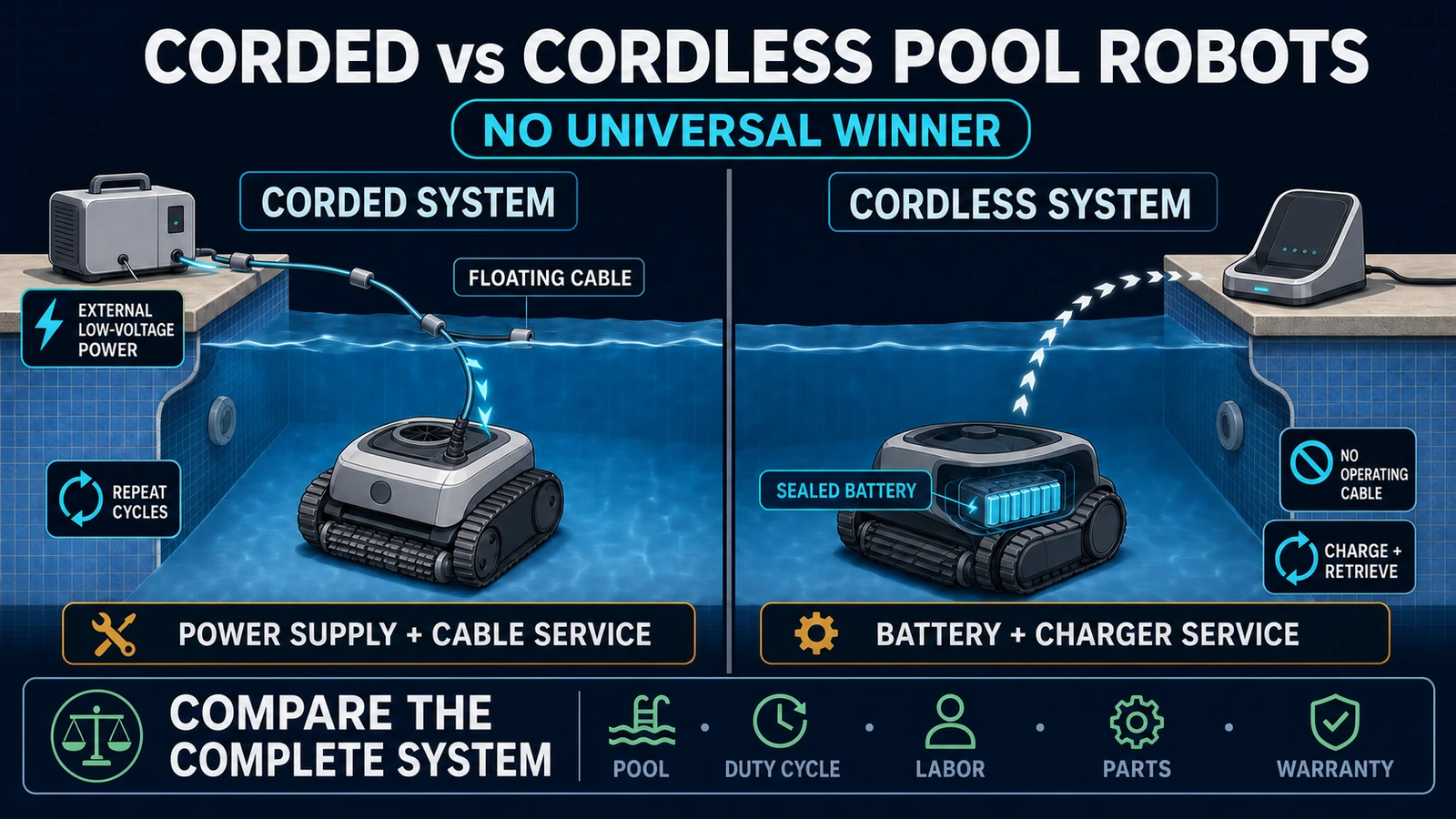
The correct checks depend on the exact model. A corded cleaner has a poolside power supply and floating cable. A cordless cleaner has a charger, battery-management system and model-specific start or water-detection sequence. Use the manual for the complete model and market version, disconnect power before inspecting accessible moving parts, and leave sealed motor, battery and electrical repairs to trained or authorized service.
Robotic Pool Cleaner Movement Problems at a Glance
| What you observe | Main area to investigate | First safe action |
|---|---|---|
| No lights, no pump sound and no movement | Wall supply and poolside power unit; or charger, charge state and battery | Stop, identify the exact power architecture and follow its manual |
| Lights are on but the robot does not start | Cycle selection, cable connection, charge state, water detection, filter installation or an error condition | Record every indicator and error code before resetting anything |
| Strong water flow from the top but no wheel or track movement | Obstruction, worn track or drive component, or traction-motor system | Power off and inspect only the externally accessible drive path allowed by the manual |
| No top water flow and no movement | Impeller obstruction, pump path, power/protection state or an internal pump/control fault | Check the operator-accessible filter and impeller path, then escalate if unresolved |
| Starts normally and stops early | Loaded filter, blocked impeller or drive, power interruption, battery/protection condition or internal fault | Record the exact run time and whether the same event repeats |
| Turns in circles or moves one way | Unequal drag, one blocked or worn side, cable pull or drive fault | Compare both sides without forcing the mechanism |
| Stops at the same drain, step or transition | Pool geometry, suction at a drain, cable management, slope or product capability | Remove the robot safely and inspect the location as well as the machine |
| Moves but does not collect debris | Filter, intake, check flap, impeller or unsuitable debris load | Diagnose cleaning flow separately from movement |
The table is a triage map, not a substitute for the product manual. The same visible symptom can have different causes on different architectures.
Confirm That It Is a Robotic Pool Cleaner
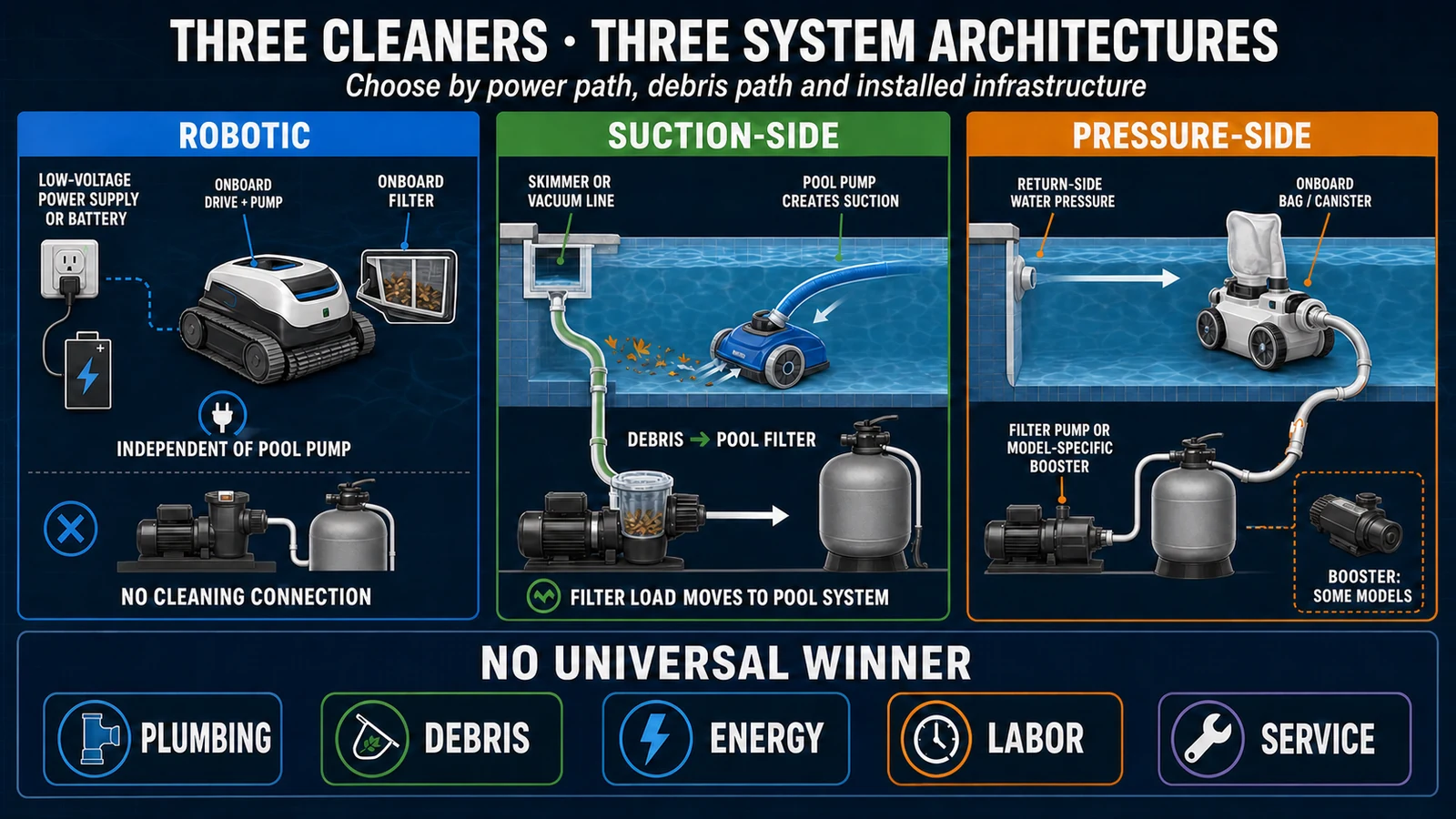
“Pool cleaner” can describe three different systems. A suction-side cleaner depends on the pool pump’s suction. A pressure-side cleaner depends on return-water pressure, often with a booster pump. An electric robotic cleaner has its own pump, filter and drive system.
This guide covers electric robotic cleaners. If the machine is attached to the skimmer, suction port or pressure return, diagnose the pool circulation system and cleaner type instead. World Clean Biz’s robotic vs suction vs pressure pool cleaner guide explains the difference, while how robotic pool cleaners work maps the robot’s own pump, filtration and drive systems.
Misidentifying the system can waste time and create unsafe advice. A dirty pool filter or incorrect valve position can directly stop a suction-side cleaner, while an electric robot normally has a separate filtration and power path.
Record the Symptom Before Touching the Machine
The most useful diagnostic evidence is the behavior before the machine is moved, cleaned or reset.
Record:
- the complete model, market version and serial number;
- corded or cordless architecture;
- status lights, charger or power-supply lights and exact error code;
- whether the robot is fully submerged and sitting on the pool floor;
- whether water exits the top outlet;
- whether both sides of the drive move, one side moves or neither side moves;
- how many seconds or minutes it runs before stopping;
- whether it stops at the same pool feature;
- the selected cleaning mode and scheduled program;
- filter load, debris type and recent maintenance;
- a short video of the start, movement and failure.
This evidence helps a dealer distinguish a customer-setup issue from a repeatable product fault. It also preserves information that may disappear after a restart.
Safety First
Remove the cleaner from the pool using the method specified in its manual. Never lift a corded robot by its floating cable. Switch it off and disconnect the poolside power supply or charger before touching an accessible impeller, wheel, track or brush.
Do not:
- operate the robot dry unless the exact service instructions explicitly authorize a test;
- use a live multimeter on wet poolside equipment as a general DIY step;
- bypass an out-of-water sensor, thermal protection, interlock or ground-fault protection;
- open a sealed motor block, battery enclosure or control box;
- connect a charger or power supply merely because its plug fits;
- continue using equipment with water ingress, a swollen battery, damaged insulation, unusual heat, smoke or a burnt smell.
Dry charging ports and follow the charging environment in the exact manual. Pool chemicals, water and electricity make improvised electrical diagnosis an unacceptable shortcut.
If a Corded Robot Has No Lights or Will Not Start
A corded robot’s power path normally includes the building socket and protection, a poolside control or power unit, a low-voltage floating cable, its connectors and the machine.
Begin with the external sequence in the manual:
- Confirm that the specified outlet and protective device are available and that the power unit is positioned as required.
- Check that the power lead and floating-cable connector are fully seated and locked in the correct orientation.
- Confirm that a cleaning cycle was actually selected and started.
- Record the indicator behavior before performing the model’s approved restart procedure.
- Inspect visible cables and connectors for cuts, deformation, corrosion or water where it should not be.
The current Maytronics Dolphin user manual separates a non-operating power supply from a robot that does not move. For the latter, it directs the user to check the floating-cable connection and, after disconnecting power, inspect for obstructions around the impeller, tracks or wheels.
The Fluidra Alpha iQ manual likewise tells users facing no movement at start-up to check power to the control box, confirm that a cycle has been launched and read the indicators. Its error table then separates pump-motor, traction-motor, out-of-water and communication events.
These examples support a diagnostic order. They do not create one reset method or one connector procedure for every brand. If the power unit, cable or connector appears damaged, stop and use the responsible seller or authorized service channel.
If a Cordless Robot Is Charged but Not Moving
Cordless products remove the floating cable but add a battery, charger or dock, battery-management electronics and a model-specific start sequence.
Check the exact manual for:
- the meaning of every charging and status light;
- whether the unit must be fully charged before diagnosis;
- whether it must enter the water within a defined time after startup;
- how it detects water and whether trapped air prevents correct seating;
- whether a schedule, storage mode or energy-saving mode is active;
- the approved charger and acceptable charging conditions.
For one product family, Maytronics’ Dolphin Liberty support page recommends a full charge, correct submersion, clean filters, clear tracks and a check for Eco Mode on specific models. Those are useful examples, but the timing, LEDs and modes must not be copied to another cordless cleaner.
If the robot will not charge, charges intermittently, becomes unusually hot or repeatedly shuts down with a battery error, treat that as a charging or battery-system case—not a dirty-track problem. Keep sealed-battery diagnosis and replacement inside the manufacturer’s service process, particularly when shipping restrictions and waterproof verification are involved.
Pump Runs but Wheels or Tracks Do Not Move
Visible water discharge from the top outlet is a valuable clue. It suggests that at least part of the pump path is operating while the drive path is not producing movement.
With the unit powered off, inspect only the components the operator manual makes accessible:
- hair, string, leaves, toys or stones around a wheel, track, brush or axle;
- a displaced, visibly damaged or severely worn track;
- foreign material between a moving component and the housing;
- a filter or access cover that is not correctly installed;
- asymmetric resistance between the two sides, without forcing either side.
BWT’s pool-cleaner support page distinguishes a robot that pumps water but does not move from one that moves but does not pump. It associates the first condition with debris preventing wheel or belt rotation or worn internal drive components.
That distinction is more useful than immediately ordering a motor. A blocked external drive part, worn consumable, traction-motor fault and control fault can all produce “not moving,” but they require different responsibility and repair levels.
Do not force a jammed track or dismantle a sealed drive module to prove the diagnosis. If accessible debris is removed and the drive remains locked, uneven or noisy, pass the case to trained service.
Robot Starts and Then Stops After a Few Minutes
An early stop is different from a no-start condition. The time pattern matters.
Possible investigation areas include:
- a filter that loads quickly with leaves, fine debris or algae;
- hair or string around the impeller, brush or axle;
- a drive component that binds under load;
- an intermittent cable, connector, charger or battery condition;
- a model-specific protection or error event;
- a failing motor, battery, power unit or controller.
The same BWT support material lists dirty filters, an obstructed impeller and an object preventing brush or belt rotation among the checks for a cleaner that starts and then stops. The Fluidra manual directs users to read the actual motor or communication code and escalate when its allowed checks do not resolve the condition.
Avoid restarting the robot repeatedly without recording what changes. Instead, note:
- the run time to the first stop;
- whether the poolside power unit remains on;
- whether the top water flow disappears before or at the same time as movement;
- the stopping location and selected mode;
- whether cleaning the permitted filter and accessible path changes the result.
If it stops at nearly the same time after every safe test, that repeatability is useful service evidence. It is not a reason to keep cycling a potentially overheating or water-damaged unit.
Robot Moves in Circles or Only One Direction
Circular or one-sided movement normally means the two sides no longer produce the same motion or resistance. The cause may be external—a jam, worn track, brush drag or cable pull—or internal, such as a traction drive or control fault.
The Maytronics manual lists moving in circles separately from moving in one direction only. It links these symptoms to filter or impeller conditions, pool conditions, power-supply position and debris, depending on the exact behavior.
Use a controlled observation:
- Does the same side always lag?
- Does the problem exist in open water or only near the cable limit?
- Is one track visibly loose, worn or blocked?
- Does it happen only while turning, climbing or crossing a drain?
- Does the machine report a traction error?
Do not use navigation software as the default explanation for a mechanically unequal machine. Conversely, do not replace a drive part before checking cable tension, the pool feature and the manual’s normal turning behavior.
Robot Keeps Getting Stuck in the Same Place
A robot can be healthy and still be incompatible with one part of a pool.
Common site factors include:
- a raised or suction-active main drain;
- a step, ledge, beach entry or sharp floor transition;
- a slope or curvature outside the product’s stated capability;
- a loose cable loop or insufficient cable reach;
- an obstacle, cover fitting or unusual pool geometry;
- slippery algae film or a surface that provides inadequate traction.
Move the robot only after switching it off as instructed, then photograph and measure the repeat location. Compare the pool feature with the product’s published pool-shape, depth, slope and drain-clearance requirements. A repeat location across several cycles points to site interaction; random stops across the pool point more strongly toward the machine or operating conditions.
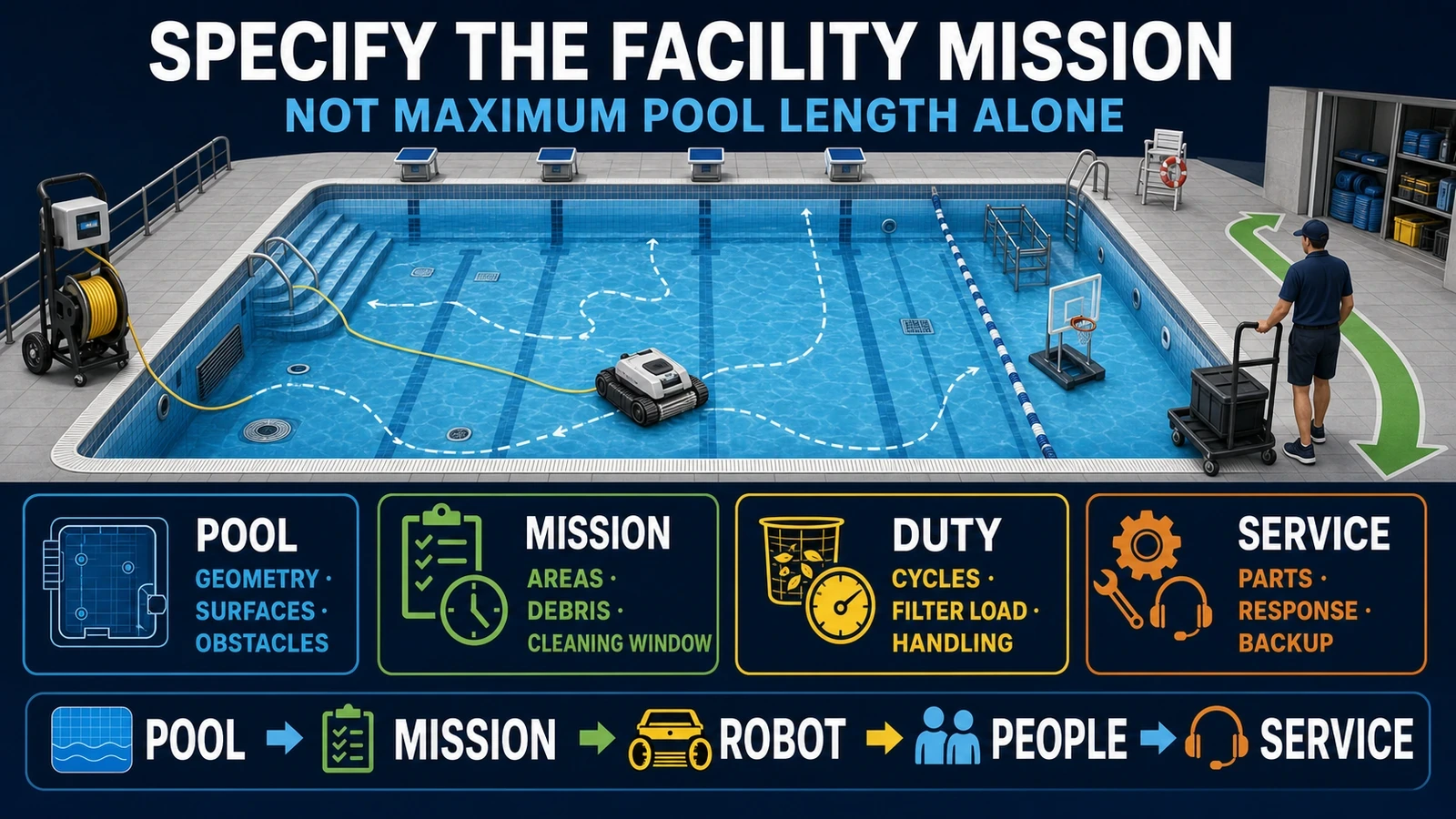
For distributors, this is a selection issue as much as a repair issue. A pre-sale pool survey and an acceptance test can prevent a functional product from becoming a recurring warranty claim.
Robot Moves but Does Not Pick Up Debris
Movement and cleaning flow are separate functions. A robot can travel normally while a clogged filter, blocked intake, damaged filter media, stuck check flap or impaired impeller prevents debris capture.
Check the operator-level items named by the manual:
- filter basket or panels are clean, intact and correctly seated;
- intake and check flaps move as designed;
- no large object blocks the water path;
- the debris type is within the filter’s intended range;
- the impeller access area is clear, with power disconnected.
Do not diagnose suction by placing a hand near a live underwater intake. Do not run a robot without its filter unless the exact manufacturer procedure explicitly instructs that test. Fine algae, silt and large leaf loads may also require different filtration or pool treatment rather than a drive repair.
Robot Does Not Climb the Walls
First confirm that the exact SKU is designed to climb walls and that the selected cycle includes walls. Floor-only robots are not defective because they remain on the floor.
If a wall-capable unit no longer climbs, investigate:
- full or clogged filtration reducing water flow;
- trapped air or incomplete submersion;
- worn brushes, tyres or tracks reducing grip;
- slippery walls, algae or water conditions;
- the wall profile, coves, ledges and pool-surface compatibility;
- battery level or a model-specific mode.
The Alpha iQ manual notes that a wall-capable cleaner does not necessarily climb immediately or on every pass; it tells users to observe the full behavior before deciding that climbing has failed. BWT similarly advises confirming that the model is not floor-only before troubleshooting filters, impeller and pool conditions.
Wall climbing deserves its own narrower guide if Search Console shows a distinct query cluster. Here it serves as an example of why product capability, mode and pool fit must be checked before a part is blamed.
Test Before Returning the Robot to Service
After an allowed external correction, use a controlled test in a compatible pool. Do not declare the machine fixed because it moved for a few seconds on the deck or at the waterline.
Record:
- exact model, serial number, firmware if relevant and selected mode;
- charge state or power-supply status;
- correct submersion and removal of trapped air;
- startup, top water flow and movement of both drive sides;
- straight travel, turning and any wall transition the SKU is designed to perform;
- run time, stopping point, error code and filter load;
- debris pickup and retention at the end of the cycle.
One complete successful cycle under representative conditions is more informative than repeated short restarts. A commercial facility may need several observed cycles and a defined pool-zone acceptance test before returning a unit to its schedule.
Stop the test and escalate if there is abnormal heat, smell, sound, water in an electrical area, a damaged battery or cable, a persistent motor/communication code, or repeat failure after the permitted checks.
B2B Service and Procurement Lessons
For a dealer or operator, a “not moving” ticket tests the entire after-sales system.
Build a symptom-first intake form
Do not accept “robot is broken” as the complete ticket. Require the exact SKU, serial number, power architecture, indicators, error code, video, cycle time, pool feature, maintenance history and proof of purchase.
Separate responsibilities in writing
Define which actions belong to:
- the end user or facility operator;
- trained dealer maintenance;
- authorized electrical or sealed-module service;
- the importer, seller or brand warranty team;
- complete-unit exchange.
An instruction to “contact the manufacturer” is incomplete when a different legal entity sold, imported and warranted the product in the destination market.
Stock the right service parts
Filters, brushes, tracks, wheels, cable assemblies, poolside power supplies, chargers and model-specific wear kits have different failure frequency and shipping constraints. Stock decisions should follow the installed fleet and exact part numbers, not the brand name alone.
Price downtime and logistics
Corded products can require cable or power-unit diagnosis. Cordless products add battery storage, charger availability and lithium return logistics. World Clean Biz’s cordless vs corded robotic pool cleaner guide explains why convenience at purchase does not remove service-system differences.
Keep warranty separate from expected life
A warranty period does not predict when a machine will fail, and opening a sealed module can affect coverage. The robotic pool cleaner lifespan guide explains how consumables, modules, service access and duty cycle shape economic life.
Commercial buyers should also confirm that the selected product is permitted for the intended duty. A residential machine that can clean a hotel pool once is not automatically warranted or supported for repeated commercial cycles. See the commercial robotic pool cleaner guide for facility-level procurement questions.
FAQ
Why does my robotic pool cleaner have power but not move?
The selected cycle may not have started, the machine may not detect water correctly, a cable or filter may be incorrectly installed, or an impeller, wheel, track or brush may be blocked. A traction motor, battery, controller or power component can also fail. Record indicators and check only the external items allowed by the exact manual before escalating.
Why does my pool robot start and then stop?
A filter or impeller can load up, a drive part can bind, power can be interrupted, or a battery or protection system can stop the cycle. Record how long it runs, whether top water flow remains and whether the same error or location repeats.
Why is water coming out of the top but the robot is not moving?
Top water flow suggests that part of the pump path is working. Focus next on externally accessible wheels, tracks, brushes and obstructions, then the traction-drive system. It does not prove that the entire robot is healthy.
Can I test a robotic pool cleaner out of the water?
Not as a universal procedure. Some robots use water detection and depend on water for cooling or normal load. Run an out-of-water test only when the exact manufacturer service instructions explicitly authorize it.
Should I reset the robot?
Only with the reset sequence for the exact model. Brands use different buttons, disconnect times, app procedures and error-clearing rules. Record the existing code and behavior before reset so that useful evidence is not lost.
Is a robot defective if it does not climb the walls?
Not necessarily. Confirm that the SKU supports wall cleaning and that the correct mode is selected. Filter flow, trapped air, worn traction parts, algae, wall geometry and battery state can also affect climbing.
When should I stop troubleshooting?
Stop when there is damaged wiring, abnormal heat or smell, battery swelling, water ingress, a persistent motor or electrical code, a locked drive after accessible debris is cleared, or any step would require opening a sealed or energized assembly. Use trained or authorized service.
Final Answer
When a robotic pool cleaner is not moving, diagnose the behavior before replacing a part. Separate corded from cordless power, then ask four questions: Is the machine powered? Is the pump moving water? Is the drive moving both sides? Does the failure repeat at the same time or place?
Those answers narrow the problem to power, pump flow, drive, blockage, setup or pool fit. Clean and inspect only the operator-accessible components listed in the exact manual. Preserve the error code and service evidence, stop at sealed electrical or battery systems, and require a controlled pool test before the robot returns to operation.