- First separate debris the robot never reaches from debris it passes over but fails to collect.
- Check the exact filter configuration, basket seating, intake and impeller flow before treating weak pickup as an internal motor fault.
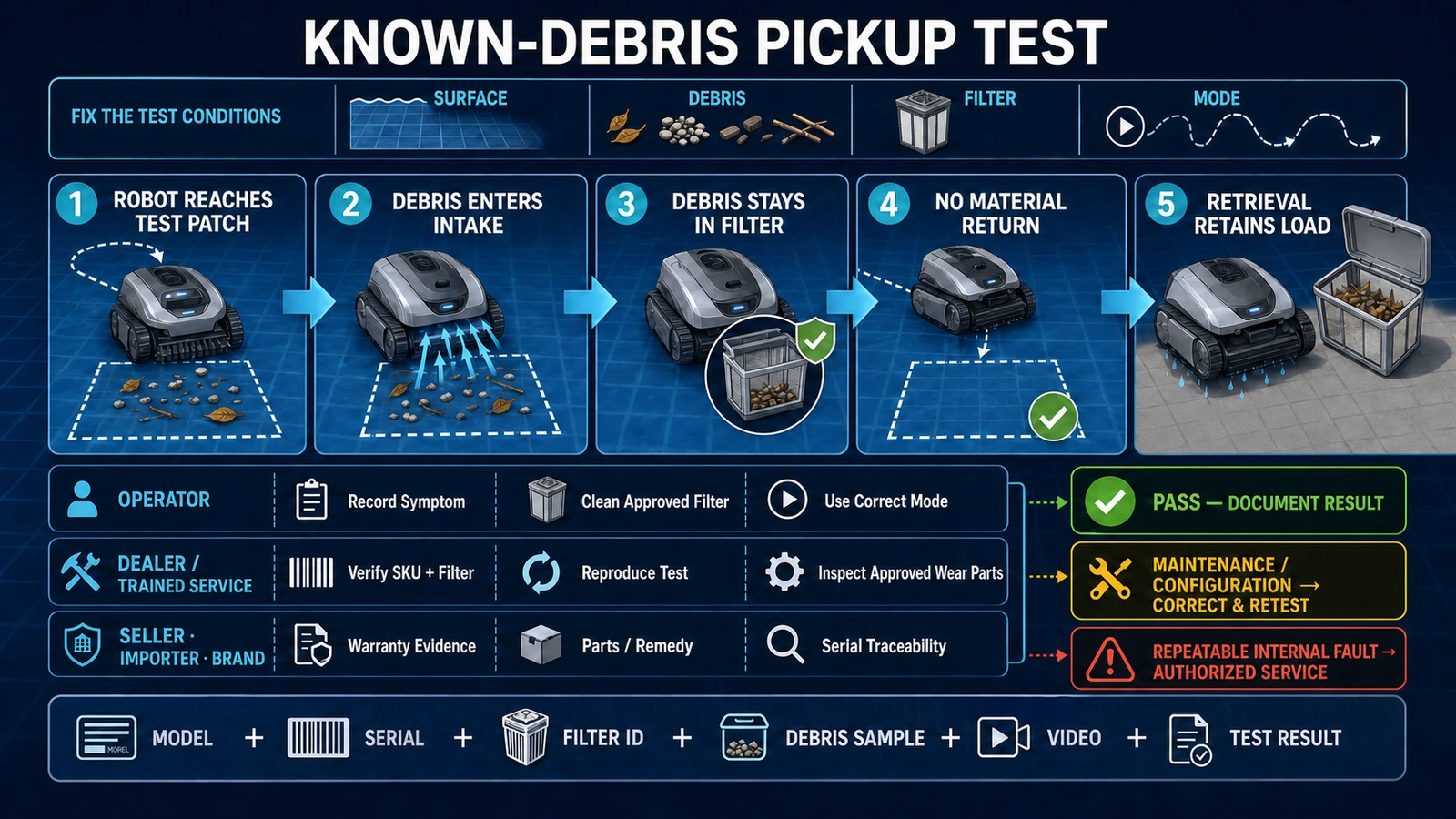
- Use known test debris and a recorded pass-retain-release result to distinguish maintenance, product fit and repeatable equipment faults.
In this article 16 sections
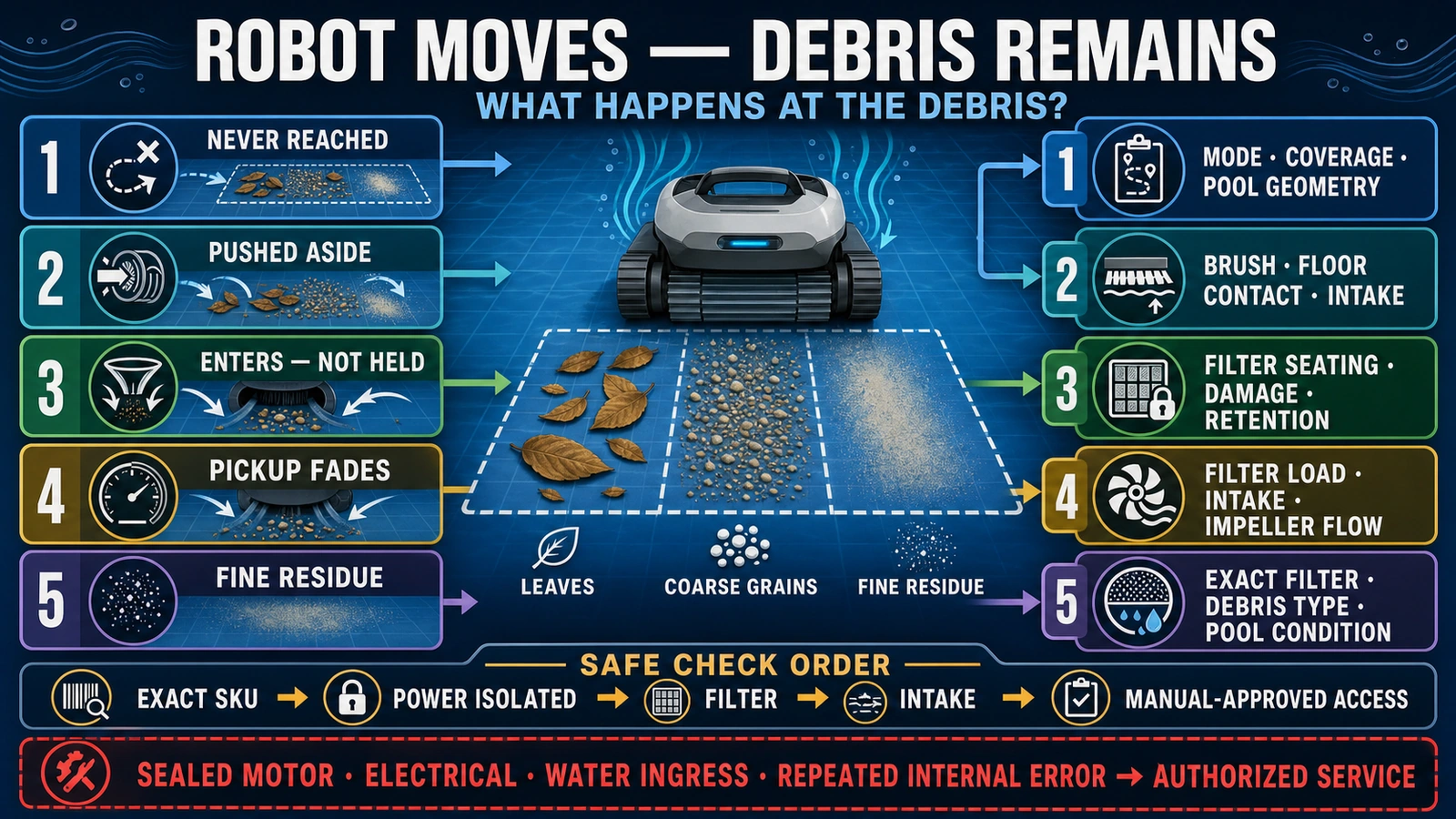
If your robotic pool cleaner moves but does not pick up debris, first determine whether it misses the debris, pushes it aside, fails to draw it through the intake, or collects it and releases it again. Then check the filter load and installation, match the filter to the debris, inspect the operator-accessible intake and impeller path, and confirm that the brushes and cleaning mode suit the pool.
Do not assume that every poor result means weak suction or a failed motor. Leaves, coarse sand, fine dust and dead algae create different collection problems. Use the manual for the exact model and market version, isolate power before inspecting accessible moving parts, and leave sealed motor, battery and electrical repairs to trained or authorized service.
Debris Pickup Problems at a Glance
| What you observe | Main area to investigate | First safe action |
|---|---|---|
| The robot never travels over the debris | Mode, starting point, navigation, cable reach or pool geometry | Run a representative cycle and map the areas actually reached |
| The robot reaches the debris but pushes it aside | Brush action, intake position, floor contact or debris too large for the opening | Power off and inspect accessible brushes and the intake |
| Leaves enter but the basket fills quickly | Debris load, basket capacity or restricted intake | Empty the basket and divide heavy cleanup into controlled passes |
| Sand or fine dirt remains after leaves are removed | Filter grade, filter loading or particles finer than the installed media can retain | Verify the exact filter and optional insert specified for the model |
| Debris enters and then returns through the outlet or after retrieval | Filter seating, damaged media, check flap or another retention path | Stop, clean and reinstall the filter; replace damaged approved parts |
| Pickup starts well and becomes weak during the cycle | Loaded or blinded filter, blocked intake or impeller-flow restriction | Isolate power and inspect only the paths allowed by the manual |
| The pool remains dirty after one full cycle | Excess load, suspended material, algae, missed zones or product limitation | Separate pool-condition work from a repeatable machine test |
| No useful pickup remains after approved external checks | Pump, sealing, internal control or another service fault | Preserve evidence and escalate to authorized service |
This table is a triage map. Filter construction, access points and permitted maintenance differ by product.
Confirm the Cleaner Type and the Exact Symptom
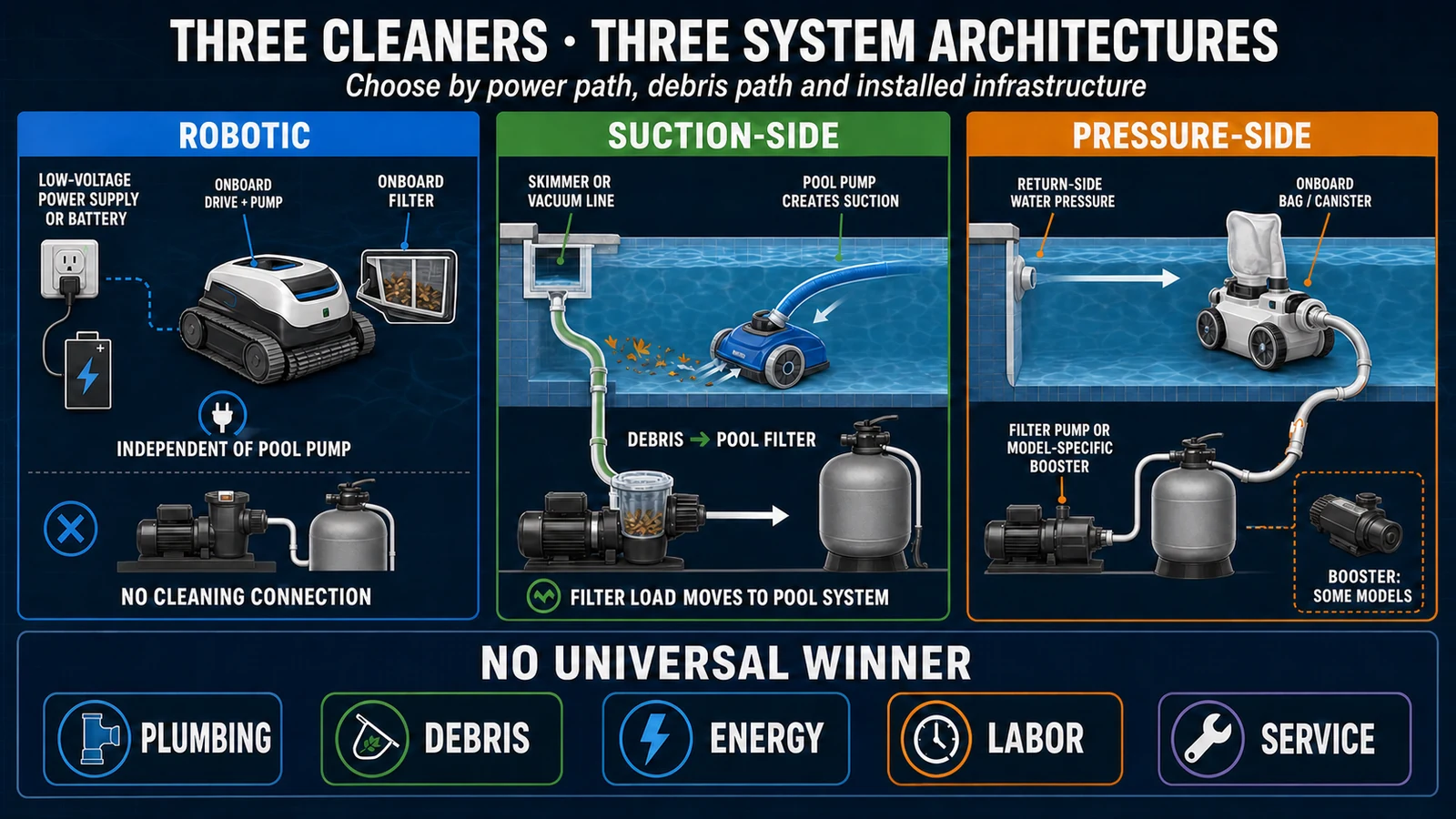
“Pool cleaner” can mean a suction-side cleaner connected to the pool pump, a pressure-side cleaner driven by return water, or an electric robotic cleaner with its own pump and filter. This guide covers electric robotic cleaners. If the machine depends on a skimmer, suction port or pressure return, use the pool circulation system and the relevant cleaner manual instead.
World Clean Biz’s robotic vs suction vs pressure cleaner guide explains those architectures. The guide to how robotic pool cleaners work maps the robot’s pump, filter, brushes and drive system.
Next, describe what “not picking up” means. A machine that never reaches a pile has a coverage problem. A machine that drives over the pile but leaves it in place has a pickup problem. A machine that briefly clears the floor and then releases material has a retention problem. Those observations lead to different checks.
Record the Evidence Before Cleaning or Resetting
Record the complete model, serial number and market version. Note the installed basket, cartridge, bag or fine-filter insert. Photograph the debris and place a ruler or familiar object beside it if particle size is not obvious.
Capture a short video showing:
- the robot approaching and passing over the debris;
- whether the brushes move the material;
- visible water discharge from the robot;
- material leaving through an outlet or falling out during retrieval;
- the filter and basket immediately after the cycle.
Also record the selected mode, run time, pool surface and the zones that remain dirty. This evidence is more useful to a dealer than the general statement “suction is weak.”
Keep the Safety and Repair Boundary Clear
Remove the cleaner using the method in its manual. Never pull a corded robot out by its floating cable. Switch the unit off and disconnect the poolside power supply or charger before touching an accessible filter, intake, brush, track or impeller area.
Do not operate the robot dry unless the manufacturer provides a specific test. Do not reach toward a moving impeller, bypass an interlock, open a sealed motor block or battery enclosure, or improvise a live electrical test around wet equipment.
Maytronics’ current Dolphin user manual tells the user to unplug the power supply before troubleshooting and separates “moves but does not clean” from movement failure. Its listed external causes include a clogged filter and debris around the impeller housing. The company’s Liberty instructions also warn that impeller blades are sharp and provide a model-specific shutdown and safety-tool process. Follow the procedure for the exact machine rather than copying a disassembly sequence from another product.
Stop and use authorized service if there is damaged insulation, unusual heat, smoke, burnt odor, water where the manual does not permit it, a repeated internal error, or a repair that requires opening a sealed component.
Check Filter Load, Seating and Damage
A robotic cleaner has to move water through the filter while retaining debris. A filter can restrict flow before it looks completely full. Fine silt, oils or other deposits may blind the media surface, while leaves can occupy volume and obstruct the inlet.
Remove and clean the filter exactly as the manual specifies. Before reinstalling it, check:
- whether the media is torn, warped or separated from its frame;
- whether the basket, cartridge, bag or tray sits fully in its intended position;
- whether the lid, filter door or retaining latch closes normally;
- whether a flap or debris-retention feature is obstructed;
- whether the installed part number belongs to the exact model.
Maytronics’ maintenance guidance states that a clogged filter prevents normal water flow and recommends rinsing the filter after retrieval. Cleaning frequency still depends on the model and pool load; the instruction is not a universal service interval.
If pickup returns immediately after the correct filter is cleaned and installed, record that result. If a clean, intact and correctly seated filter changes nothing, continue through the water path rather than repeatedly washing the same part.
Match the Filter to Leaves, Sand and Fine Debris
One filter does not handle every debris task equally. A coarser structure can accept leaves and larger material with less immediate restriction. A finer insert can retain smaller particles but may load faster and reduce water flow sooner.
Use only the filter combinations approved for the exact product. For example, WYBOT’s current C2 page lists a 180-micron pre-filter and a 10-micron fine filter. Its dirty-pool guidance separates larger-debris passes from fine-particle filtration and warns that the fine filter may require repeated cleaning. WYBOT’s S3 guide uses different filter grades for pool opening, routine maintenance and fine debris.
Aiper’s current Scuba S1 Pro page provides another model-specific example: it lists a 180-micron first stage and a 3-micron MicroMesh second stage. These figures describe those configurations. They do not create an industry-wide rating or prove that one robot will capture every material smaller than a stated number under real pool conditions.
Ask three practical questions:
- Is the remaining material larger than the intake but being pushed around?
- Is it passing through or around the installed filter?
- Is the finer filter loading so quickly that water flow collapses during the cycle?
Do not call every pale or green residue “algae.” If the material may be biological growth or a water-quality problem, have the pool condition assessed and treated appropriately before using robot performance as the only diagnosis.
If Debris Returns to the Pool
Debris can return while the robot is running or when it is lifted out. The timing matters.
Material coming from an outlet during operation points toward filter bypass, damaged media, incorrect seating or particles the installed filter does not retain. A basket that remains empty while material visibly enters and leaves the robot is strong evidence for a retention-path problem.
Material falling out during retrieval may involve an overloaded basket, an obstructed check flap, incorrect lifting or a product-specific retention design. Use the prescribed retrieval position and allow the machine to drain as instructed. Do not turn a retrieval observation into an internal repair without reproducing it.
After cleaning and reinstalling approved parts, place a small, known amount of representative debris in a controlled area. Record whether it enters, remains in the filter and stays contained during retrieval.
Check the Intake and Impeller Flow
The filter can be clean while the water path is restricted elsewhere. Hair, leaf stems, string and small fragments can obstruct an intake or an operator-accessible impeller area.
With power isolated, inspect only the openings and covers the exact manual identifies as user-accessible. Never force an impeller, use a power drill on a service cover or reach into a sharp-bladed area without the specified protection.
The Maytronics user manual lists debris in the impeller housing as a cause when a robot moves but does not clean. A current Maytronics quick guide also states that a clogged impeller can reduce vacuuming performance even when the filter is clean. That supports the water-path diagnosis; it does not authorize the same impeller-opening procedure on every robot.
If the intake and approved impeller area are clear but water discharge is absent, weak or interrupted, preserve the video and error information. Pump-motor, internal blockage, sealing and control faults belong to trained or authorized service.
Check Brushes, Intake Lips and Floor Contact
The pump cannot collect material that never reaches the intake. Brushes loosen and guide soil, while intake lips or similar structures help keep material in the pickup zone.
Inspect accessible brushes and flexible intake parts for entangled hair, wear, deformation or incorrect installation. Compare both sides. A brush that turns but no longer contacts the surface may stir debris without directing it into the flow.
Pool surface matters. A brush and traction system that works on smooth vinyl may behave differently on tile joints, textured finishes or uneven floors. Confirm that the exact model and brush configuration are approved for the surface. Do not treat a universal product claim as proof of performance in every pool.
Separate Coverage Failure From Pickup Failure
Before changing filters or requesting service, confirm that the robot actually crosses the dirty areas.
Review the selected floor, wall, waterline or automatic mode. Note whether steps, benches, shallow platforms, tight corners or drain features are within the written capability of the product. Corded units also need the cable placement and reach specified by the manufacturer.
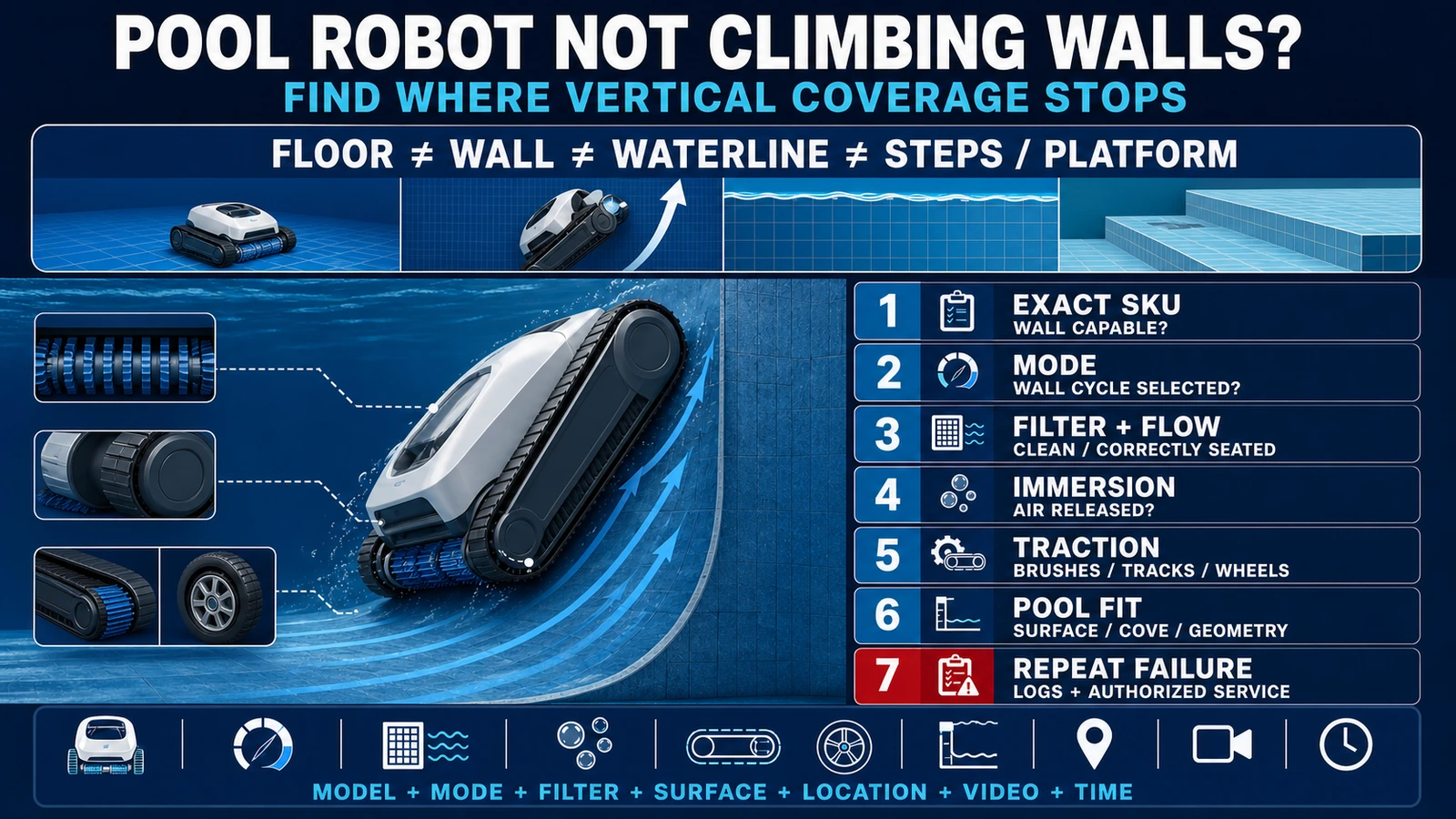
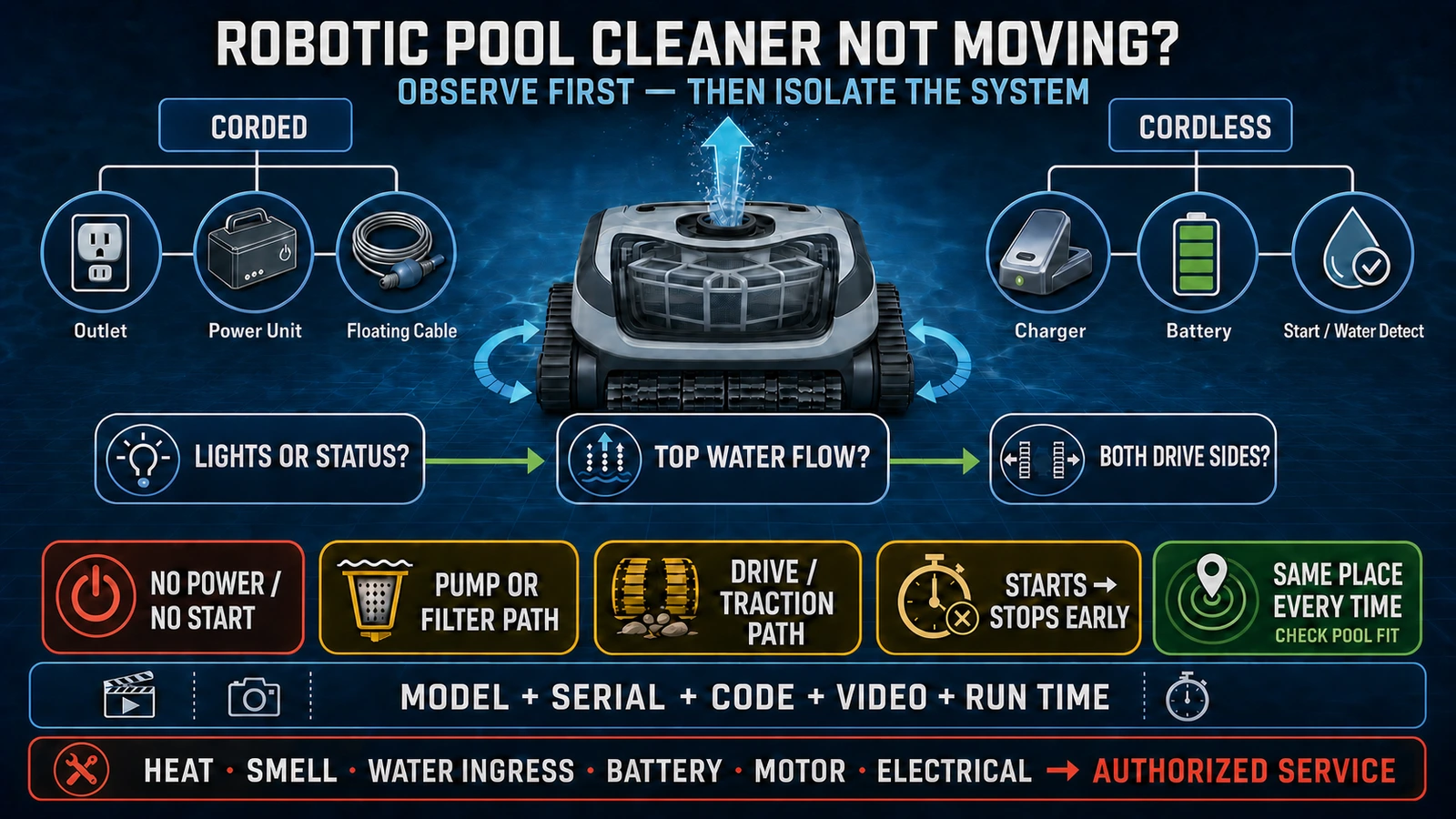
If the robot cleans every area it reaches but leaves untouched zones, focus on mode, navigation, pool geometry and product fit. The robotic pool cleaner not moving guide covers repeatable stopping and drive symptoms. The wall-climbing guide covers traction, transition and wall acceptance.
If it repeatedly passes directly over known debris without collecting it, continue with the pickup system and controlled test.
Separate Heavy Pool Load From Product Failure
A residential robot designed for routine maintenance may not clear storm debris, a seasonal opening or a heavy algae event in one cycle. Maytronics’ current Niya support page explicitly describes its Aquasweep vacuum as a routine-maintenance product rather than a heavy-debris or algae-cleanup tool. Polaris’ official support likewise advises additional cycles or manual cleaning when the pool carries more dirt than a normal robot cycle can manage.
This does not excuse poor product performance. It defines a fair test. Reduce an exceptional load, restore the pool to a known condition and then test the robot with a repeatable quantity of representative debris.
Fine material suspended by brush action may settle again after the robot passes. Dead algae or treatment residue may also require pool-filtration or professional water-care work beyond the robot’s onboard filter. Diagnose the pool and the machine as two connected systems.
Run a Controlled Pickup and Retention Test
A useful test replaces “the pool still looks dirty” with observable results.
- Confirm that the robot is clean, charged or powered normally, and fitted with the approved filter.
- Choose a small test area on a compatible surface.
- Place a counted or photographed quantity of representative debris in the path.
- Record whether the robot reaches and passes over the test area.
- Record how much debris is picked up, pushed aside or left behind.
- Observe whether material returns through the outlet during operation.
- Retrieve the machine as instructed and check for loss during draining.
- Open the filter and photograph what was retained.
- Repeat once after an approved correction if needed.
Do not publish a pickup percentage from an uncontrolled demonstration. A credible comparison requires the same debris, surface, filter, mode, starting condition and acceptance rule.
When to Escalate to Service
Use the responsible seller or authorized service when:
- a clean, correct and intact filter does not restore useful pickup;
- the robot has no normal water discharge after approved external checks;
- an error code or abnormal sound repeats under the same conditions;
- debris bypass continues with the correct filter fully seated;
- a pump, seal, motor, battery or control enclosure must be opened;
- there is water ingress, electrical damage or another stop-use condition.
Send the model, serial number, market version, filter part numbers, purchase evidence, videos, test debris and every action already taken. That evidence helps distinguish an accessory issue, maintenance case, product mismatch and repeatable internal fault.
B2B Procurement and After-Sales Lessons
Specify debris capability, not “strong suction”
A procurement sheet should name the target debris and pool conditions. Record the standard and optional filters, intake limit, usable basket volume and cleaning modes. Pump-flow claims alone do not establish pickup and retention performance.
Test the exact configuration
Run the demonstration with the production SKU, included filter and destination-market accessories. If the sales claim depends on an optional fine filter, include its price, cleaning burden and stock plan.
Define the acceptance method
Agree on the surface, debris, quantity, cycle and pass criteria before delivery. Include retrieval retention and the treatment of steps or excluded zones. A visual impression after an uncontrolled pool cycle is not a contract test.
Separate maintenance from warranty
Fluidra’s current Polaris limited warranty is a useful example of why the distinction matters: it lists several filter and brush components as wear items and identifies blocked cleaner parts and product misapplication among exclusions. Buyers must retain the policy for their exact product and market rather than assuming one global rule.
Stock filters and evidence tools
A distributor needs the approved filter grades and wear parts, but also a standard intake form and test method. Replacing machines without identifying debris, filter configuration or pickup behavior hides the real failure pattern.
Release the full cleaning path
After service, verify that the robot crosses the test area, collects the intended debris, retains it during the cycle and retrieval, and completes a representative run without recurring warnings. “Motor runs” is not a pickup acceptance result.
FAQ
Why is my robotic pool cleaner moving but not picking up debris?
The common external paths are a loaded or incorrectly installed filter, debris that does not match the installed filter, a blocked intake or impeller path, worn or obstructed brushes, missed coverage, or a pool load beyond one normal cycle. Diagnose what the robot does at the debris before assuming an internal motor fault.
Why does my pool robot pick up leaves but not sand?
Leaves and sand impose different intake and filtration demands. Verify whether the exact model requires a finer approved filter for sand and whether that filter is clean enough to maintain water flow.
Why does my robotic pool cleaner spit dirt back into the pool?
Check whether the filter is damaged, incorrectly seated or too coarse for the material. Also observe whether debris escapes during operation or only during retrieval, because those patterns point to different retention checks.
Can a clogged filter reduce suction?
It can restrict water flow through the cleaner and reduce pickup performance. A filter can be restricted by fine material before its basket looks completely full.
Should I clean the impeller?
Only if the exact manual identifies it as an operator-accessible maintenance task. Isolate power and follow that model’s safety procedure. Impeller blades can be sharp, and sealed pump repairs belong to authorized service.
Why is fine dust still on the pool floor?
The particles may be finer than the installed filter retains, may be suspended and resettling, or may be treatment residue that requires broader pool filtration or water-care work. Confirm the material before changing the robot.
Does higher suction mean better debris pickup?
Not by itself. Intake geometry, brush contact, filter grade, water-flow restriction, basket capacity, navigation and the debris all affect the delivered result.
When is poor pickup a warranty issue?
Warranty depends on the exact policy and diagnosis. A repeatable internal fault after approved maintenance differs from a blocked filter, worn brush, wrong accessory or product used outside its stated application.
Final Answer
When a robotic pool cleaner moves but leaves debris behind, diagnose the complete pickup path: reach the debris, guide it into the intake, move enough water, retain it in the correct filter and keep it contained during retrieval.
Start with the exact filter and visible water path, then separate coverage and pool-condition problems from a repeatable equipment fault. For buyers and dealers, use known debris and a recorded acceptance test so maintenance, product fit and warranty responsibility are based on evidence.