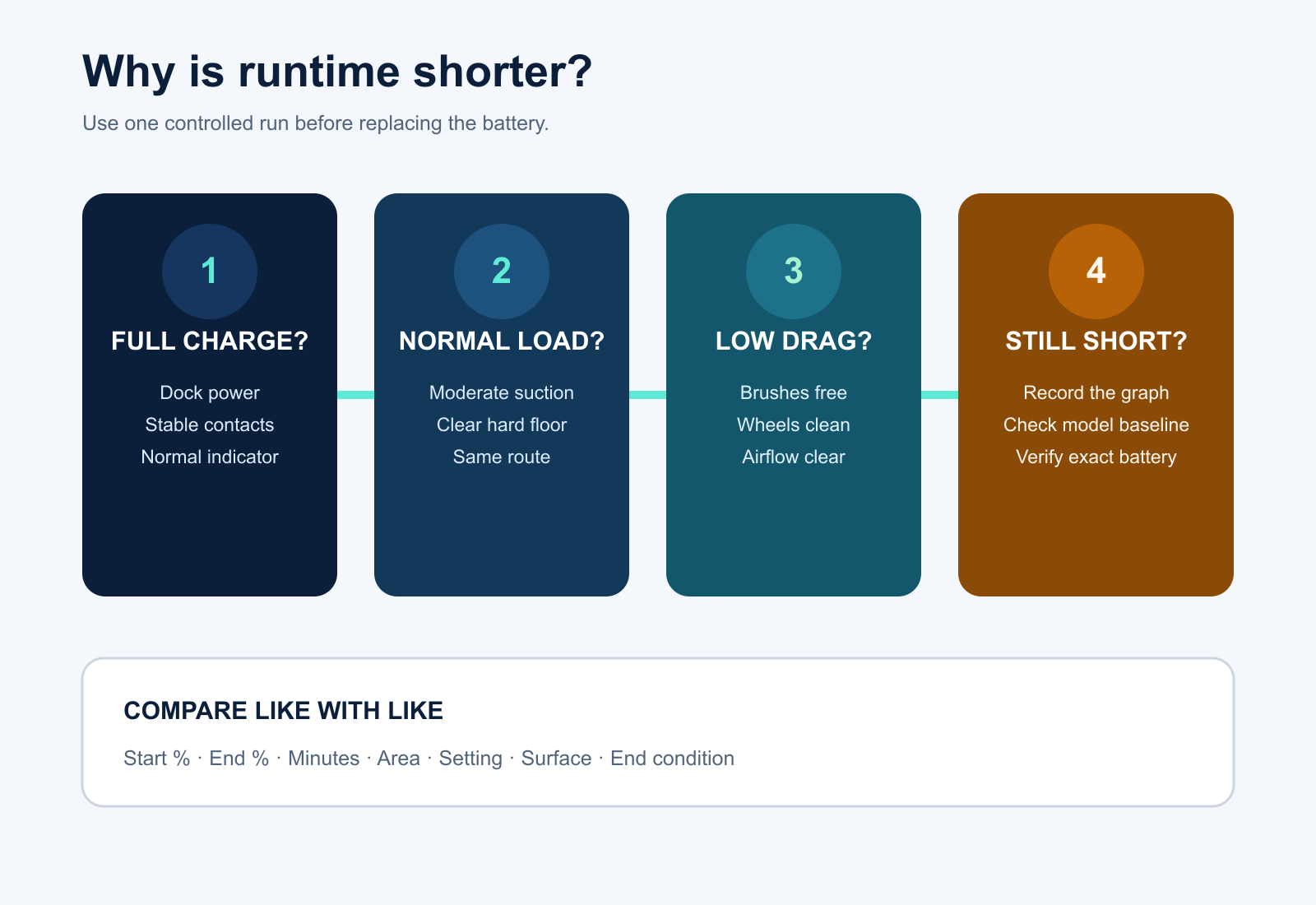
- Confirm that the robot reaches a full, stable charge before judging runtime; incomplete charging and rapid discharge are different faults.
- Compare one controlled run at a moderate setting on clear hard floor, then inspect brushes, wheels, filters and routes for extra load.
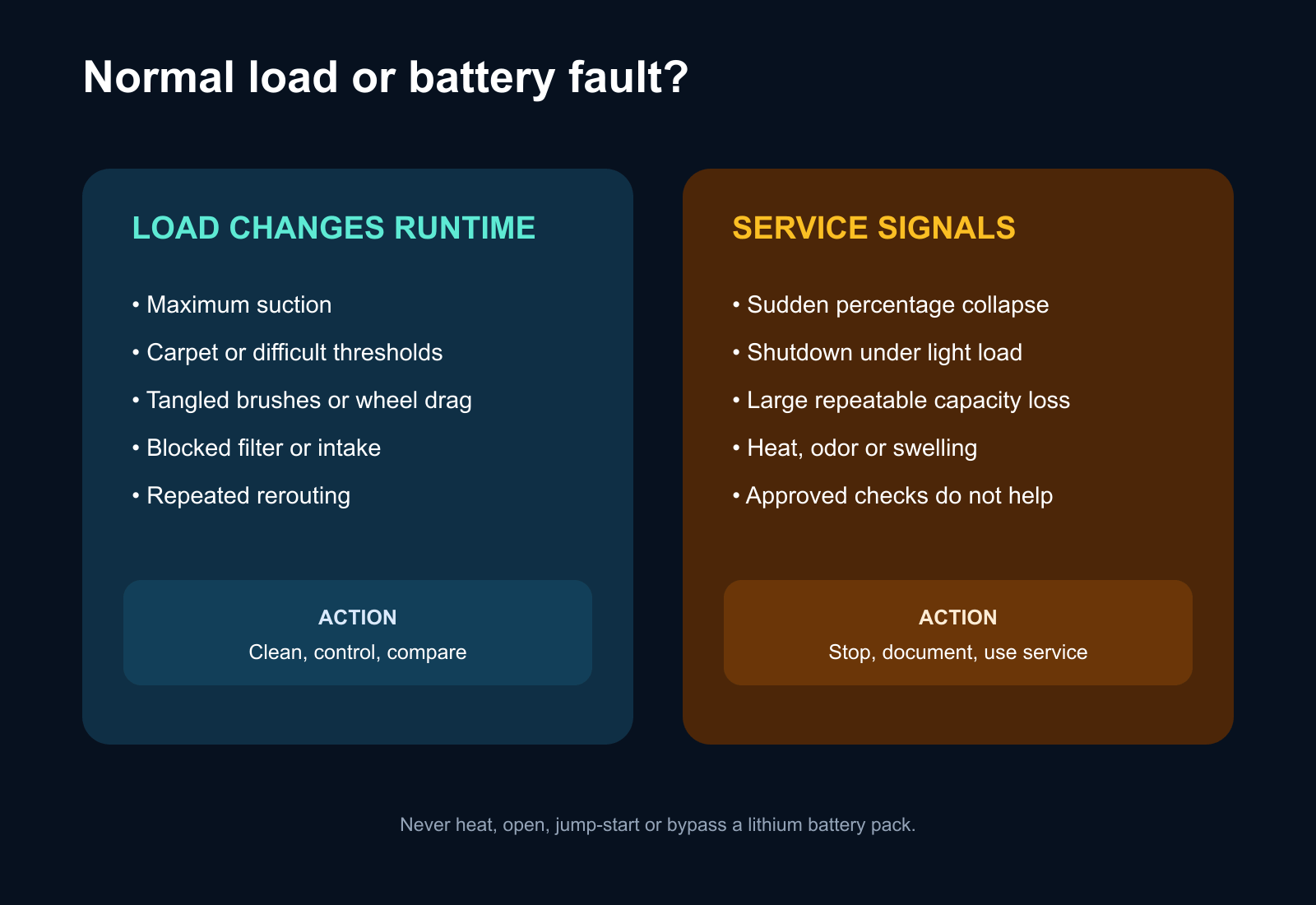
- A large repeatable runtime loss after external checks, sudden shutdowns, swelling or unusual heat requires the exact approved battery or authorized service.
In this article 12 sections
If your robot vacuum battery drains fast, first confirm that it starts from a full, stable charge. Then compare one controlled cleaning run at a moderate setting on clear hard floor. Short runtime can come from high suction or mop settings, carpet, repeated obstacle recovery, tangled brushes, blocked airflow, cold or hot conditions, software behavior or an aging battery.
Do not order a battery from the App percentage alone. Record the starting charge, setting, floor type, cleaned area, elapsed time, end condition and whether the percentage fell smoothly or dropped suddenly.
Fast Battery Drain at a Glance
| What you observe | Leading area to check | First safe action |
|---|---|---|
| Never reaches a full charge | Dock power, contacts, temperature or charging system | Solve the charging problem first |
| Runtime is short only on carpet or maximum suction | Normal workload and settings | Compare a moderate setting on hard floor |
| Runtime fell after hair or debris accumulated | Brush, wheel, filter or intake drag | Power off and clean user-serviceable parts |
| Robot spends a long time trapped or rerouting | Obstacles, thresholds, map or traction | Compare a clear-room mission |
| Percentage drops sharply or robot shuts off | Battery, connection, reporting or power fault | Preserve the graph and stop repeated deep discharge |
| Runtime has declined gradually over months or years | Battery aging or increasing load | Run a controlled comparison and verify the exact battery |
| Battery area is hot, swollen or smells unusual | Safety-critical battery or electrical fault | Stop use and isolate the product as instructed |
1. Separate Incomplete Charging from Fast Discharge
A robot that begins at a displayed 100% can still have an unstable contact, interrupted charging history or reporting problem. Confirm the normal charging indication and whether the percentage remained full while docked.
If the robot does not charge normally, use the dedicated robot vacuum not charging guide. Clean only the accessible contacts and use only the dock, adapter and battery approved for the exact model and market.
Record whether the battery falls gradually during cleaning or collapses near one percentage. A sudden drop or immediate shutdown is more useful evidence of a battery, connection or reporting fault than a single short mission.
2. Run One Controlled Runtime Test
Manufacturer runtime claims use defined settings and test conditions. They are not a promise that maximum suction, carpet boost, repeated mop washing and heavy obstacle recovery will last the same time.
For a useful comparison:
- complete a normal full charge;
- empty the bin and service the filter as instructed;
- remove visible hair from brushes, caster and wheels;
- choose a moderate or standard cleaning setting;
- use a clear, dry hard-floor area;
- start normally from the dock;
- record start percentage, end percentage, elapsed time and cleaned area.
iRobot's official short-runtime procedure similarly starts with a full charge and a timed run, while noting that carpet can reduce runtime. Use its model-specific thresholds only for the listed Roomba and Braava families, not as universal numbers for every robot vacuum.
3. Check Settings and Floor Load
Higher suction requires more motor power. Carpet boost, repeated edge passes, deep-clean modes, heated or intensive dock functions and frequent mop-wash returns can also change the energy used per mission.
Compare like with like. If the robot lasts much longer on hard floor at a moderate setting, the battery may be responding normally to workload. eufy's official E25/E28 guidance specifically identifies stronger suction and debris around brushes, mops and wheels as causes of faster discharge for those models.
Do not disable safety functions merely to extend runtime. Instead, use a setting appropriate to the floor and cleaning need.
4. Remove Mechanical and Airflow Drag
Hair around a brush cap, a partly jammed caster, a wheel packed with debris or a blocked filter makes motors work harder. The robot may still move, so the problem can appear first as shorter runtime rather than a brush error.
With the robot powered off and following the manual:
- remove the main brush and clean its approved ends and caps;
- check the side brush for thread and deformation;
- clean the caster and visible wheel wells;
- empty the bin and service the filter and intake;
- confirm the brush guard, bin and mop assembly are correctly seated.
Use the brush-not-spinning guide if a brush is stalled, or the leaving-dirt-behind guide if airflow and pickup are also poor.
5. Check Route Efficiency and Recharge Behavior
A healthy battery can appear weak if the robot repeatedly escapes cables, climbs difficult thresholds, circles, relocalizes or travels between separated rooms. Review the completed path and compare the area cleaned per unit of charge.
Some robots intentionally return to charge and resume a large mission. iRobot documents Recharge and Resume for supported models, so an early dock return is not automatically battery failure. If the robot cannot find the base, use the return-to-dock guide rather than replacing the battery.
Firmware can affect battery reporting and route behavior. Preserve the version and original mission record before updating or resetting anything. Follow only the exact model's official update procedure.
6. Consider Temperature and Storage History
Battery performance and charging can change outside the permitted temperature range. Move an intact robot only to the environment stated in its manual and let it stabilize naturally. Never heat, chill, open or jump-start a battery pack.
Long storage at an empty state can also damage capacity. Record how long the product was unused, whether it remained on its powered dock and whether the manufacturer required a storage or ship mode. Do not copy storage instructions between battery chemistries or model families.
7. When Battery Aging Becomes the Leading Cause
An aging battery becomes more plausible when the robot fully charges, the external power path is stable, user-serviceable parts move freely, settings and floor conditions are controlled, and runtime remains far below the same robot's earlier baseline.
eufy notes that rechargeable lithium-ion battery performance degrades with use and lists short runtime despite a full charge as a replacement signal for specified RoboVac families. iRobot also advises considering replacement after a controlled model-specific runtime test falls below its listed threshold.
Use the exact approved battery. Verify model number, voltage, connector, battery-management compatibility, enclosure, warranty and who may replace it. A physically fitting third-party pack is not proof of electrical or software compatibility.
When to Stop and Use Service
Stop using the robot for swelling, smoke, melting, unusual heat, burnt odor, damaged insulation, liquid intrusion or a battery enclosure that has changed shape. Use authorized service when charge or percentage changes abruptly, the robot shuts down under a repeatable light load, the battery is not owner-serviceable, or a correct replacement does not restore normal operation.
Provide the model, serial number, age, firmware, charging history, setting, surface, elapsed runtime, percentage graph and any error.
FAQ
Why does my robot vacuum battery die so quickly?
Common causes include incomplete charging, maximum suction, carpet, mechanical drag, blocked airflow, inefficient routes, temperature, software reporting and battery aging. Compare one controlled run before replacing parts.
Does maximum suction drain a robot vacuum battery faster?
Yes. Higher suction increases power demand. Some mop, carpet and dock settings also add load, so compare runtime using the same setting and floor.
Can tangled hair cause fast battery drain?
Yes. Hair around brushes, caps, wheels or the caster increases mechanical resistance. Clean only the user-serviceable assemblies described by the manual.
Should I replace the battery when runtime gets short?
Only after confirming a full charge, controlled conditions and a clean mechanical path. If runtime remains much lower than the robot's own previous baseline, verify the exact approved replacement or use service.
Is returning to charge early a battery failure?
Not always. Supported robots may recharge and resume large missions. Check the mission history, starting charge and whether the robot resumes normally.
Final Answer
When a robot vacuum battery drains fast, verify a complete charge, then run one controlled mission on clear hard floor at a moderate setting. Clean approved brushes, wheels, filter and intake; compare floor, suction and route load; and preserve the battery graph and firmware version.
If runtime still falls sharply or remains far below the robot's earlier baseline, verify the exact approved battery or use authorized service. Stop immediately for heat, swelling, odor, smoke or damage.