- Use the dirt pattern to separate debris that was never collected from dust that falls back out after collection.
- Empty and correctly reinstall the bin, service the filter, clear the intake and clean the complete brush assembly before changing maps or assuming the suction motor has failed.
- A repeatable test patch on the same floor and setting shows whether the problem follows the robot, the route or a specific surface.
In this article 12 sections
If your robot vacuum is leaving dirt behind, first look at the pattern. A narrow trail or small piles can mean collected debris is falling back through a full bin, blocked intake or incorrectly seated filter. Dirt remaining along walls points more toward the side brush or route. A broad uncleaned strip points toward the main brush, suction path, cleaning setting or missed navigation coverage.
Empty and reinstall the bin, service the filter exactly as the manual allows, clear the intake and remove hair from the main and side brushes. Then run a repeatable test patch on the same dry floor and setting. Do not judge performance from a single pass over an uncontrolled mix of large debris, fine dust, wet material and deep carpet.
Dirt Patterns at a Glance
| Dirt pattern | Leading area to check | First safe action |
|---|---|---|
| Narrow trail behind the robot | Full bin, blocked intake, flap or sealing path | Empty and correctly reinstall bin and filter |
| Small piles appear after turns | Side brush throwing debris or intake unable to capture it | Clean side brush and reduce the test to a small dry patch |
| Broad strip remains in the center | Main brush, intake, suction or brush contact | Clean the complete brush and suction opening |
| Edges stay dirty | Side brush wear, wall tracking or route coverage | Inspect side brush and review the cleaning path |
| Fine dust remains but large debris is collected | Filter loading, suction setting, seal or surface limits | Service the filter and test the approved higher setting |
| Debris is left only on carpet | Brush engagement, carpet depth, suction mode or model limit | Compare the same debris on hard floor |
| Robot skips entire areas | Map, no-go zone, obstacle or route issue | Review the App path rather than replacing filters |
1. Decide Whether Dirt Was Missed or Dropped
Watch one short supervised pass. If the robot never travels over the dirty area, the problem is coverage or navigation. If the brushes touch the debris but push it sideways, investigate brush condition, speed and intake capture. If debris disappears under the robot and then reappears behind it, investigate the bin, intake, internal flap and sealing path.
This distinction matters because stronger suction cannot repair a room the robot never enters, and remapping cannot repair a clogged filter.
Photograph the pattern before cleaning. Record the floor type, debris type, suction mode, number of passes, bin state and App route so the result can be repeated.
2. Empty and Reinstall the Dustbin
An overfilled bin restricts usable airflow and may allow debris to escape when the robot turns or crosses a threshold. Empty it even if an automatic station normally handles collection. Check whether the station actually completed its emptying cycle and whether the robot's bin and collection ports are clear.
Reinstall the bin, filter and any user-removable flap or screen in the exact orientation. A missing, wet, warped or poorly seated filter can change airflow and sealing. Never operate the robot without the required filter.
Dreame's official troubleshooting lists a full dust box, clogged filter, tangled main brush and low suction setting as causes of reduced cleaning. Its L10s Plus guidance also identifies blockage at the dust-collection port as a cause of weak pickup or dust leakage.
3. Service the Filter Correctly
A filter can look clean on the surface while fine dust blocks airflow through the media. Follow the exact tapping, brushing, washing, drying and replacement instructions for the model. Some filters are washable and others are not.
If washing is permitted, reinstall only after the specified complete drying period. A damp filter can restrict airflow and may damage the product. Do not use compressed air, detergents, sharp tools or aggressive brushing unless the manufacturer allows them.
Replace a torn, deformed, permanently loaded or incorrectly fitting filter with the approved part. A generic filter that fits loosely can leak dust even when the motor sounds strong.
4. Clear the Intake and Clean Both Brushes
Power off the robot and remove the user-serviceable main brush. Clean the middle, both ends, end caps, bearings, guard and suction opening. Inspect the side brush for hair below its hub, bent arms and missing bristles.
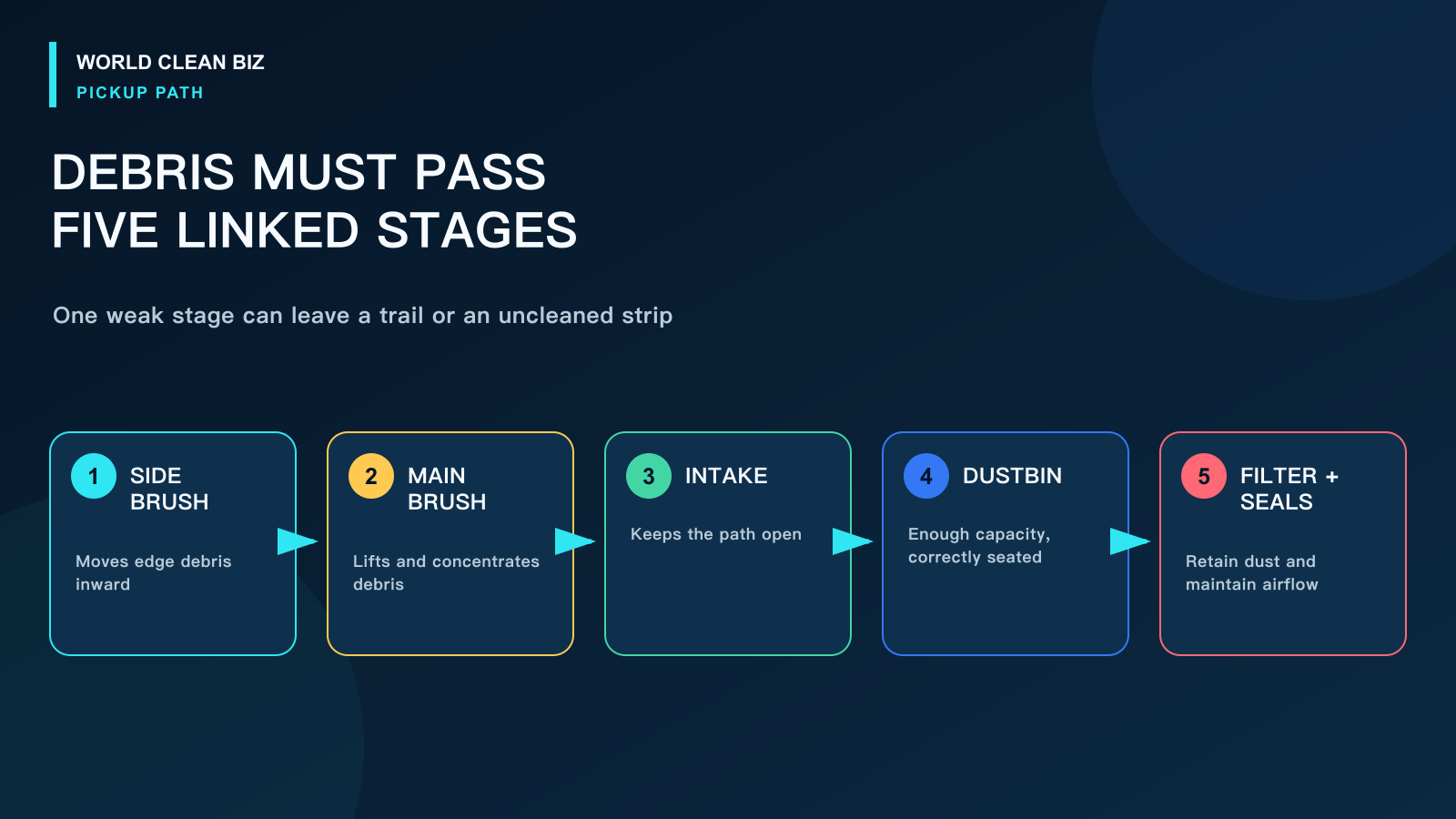
Roborock manuals identify a full dustbin, blocked filter and jammed main brush as separate causes of poor cleaning or dust falling out. That sequence is useful because the pickup system depends on all three stages: the brush must move debris into the intake, airflow must transport it and the bin/filter system must retain it.
If the main or side brush does not turn, use the dedicated robot vacuum brush not spinning guide rather than continuing to increase suction.
5. Check the Suction Setting and Floor Condition
Confirm the robot did not switch to a quiet, reduced-power or special mode. Use an approved higher suction setting for one controlled comparison, not as a permanent workaround for a blocked path.
Keep the test dry. Robot vacuums are not general-purpose wet pickups unless the exact product says otherwise. Damp dust can stick to the intake, brush chamber and bin. Large, sharp or dense debris may also exceed the product's intended use.
Carpet pickup depends on pile depth, brush design, airflow, navigation speed and whether the robot detects the surface correctly. A model may collect crumbs on hard floor yet leave embedded fine material in deep carpet without being defective.
6. Review the Cleaning Route
Open the completed-job map and compare the path with the dirt pattern. Look for skipped zones, furniture changes, closed doors, unintended no-go areas, single-pass settings or a route that approaches debris only from one direction.
If the robot physically misses a zone, fix access or mapping. If it crosses the same patch and leaves debris, remain on the mechanical pickup path.

7. Run a Repeatable Pickup Test
Choose a small, safe, dry hard-floor area. Start with a clean bin, correctly serviced filter and clean brushes. Place a modest amount of representative dry debris in a marked patch and use the same cleaning mode for each comparison.
- Pickup returns after maintenance: monitor the next full cleaning cycle and shorten the maintenance interval if needed.
- Debris is pushed sideways: inspect side-brush condition, speed behavior and approach direction.
- Debris passes under the robot but remains: inspect main-brush contact, intake blockage and airflow.
- Debris is collected and then falls out: inspect bin seating, flap, port and seals; use service if the internal path is inaccessible.
- Hard-floor result is normal but carpet remains poor: compare the model's carpet capability and approved settings.
Avoid flour or extremely fine test dust, metal, glass, liquids and large quantities that could damage the vacuum or create an inhalation hazard.
When to Use Service
Use authorized service when airflow remains weak after approved filter and intake maintenance, the suction motor changes pitch or overheats, the brush drive fails, debris falls from an inaccessible internal path, a seal or flap is damaged, or the robot has liquid intrusion.
For support, provide before-and-after photos of the test patch, the floor and debris type, suction mode, filter and brush condition, App route and a short video. A repeatable test is more useful than a general statement that the floor is still dirty.
FAQ
Why does my robot vacuum leave a trail of dirt behind it?
The bin may be full, the intake or dust port may be blocked, or a flap, filter or seal may not be seated correctly. Empty and reinstall the collection path before testing suction.
Why does the side brush scatter debris?
The brush can strike light debris faster than the intake captures it, especially near turns or on smooth floor. Clean and inspect the side brush, use a controlled patch and confirm the robot completes another approach.
Can a dirty filter reduce pickup even if suction sounds normal?
Yes. Fine dust can restrict airflow without producing an obvious sound change. Service or replace the filter only according to the exact manual.
Should I increase suction to maximum?
Use a higher approved setting as a comparison after the bin, filter, intake and brushes are clean. Maximum power should not be used to hide a blockage or damaged part.
Why are only the room edges dirty?
Inspect the side brush and review the wall-following route. A worn or jammed edge brush and incomplete route coverage are more likely than a central suction failure when the middle is clean.
Final Answer
When a robot vacuum leaves dirt behind, use the pattern to determine whether debris was missed, scattered or collected and dropped. Empty and correctly reinstall the bin and filter, clear the intake, clean both brushes, confirm the suction setting and compare the App route with the dirty area.
Run one repeatable dry hard-floor test. If debris still falls from an inaccessible path, airflow remains weak or a brush or motor does not operate normally, preserve the test evidence and use authorized service.