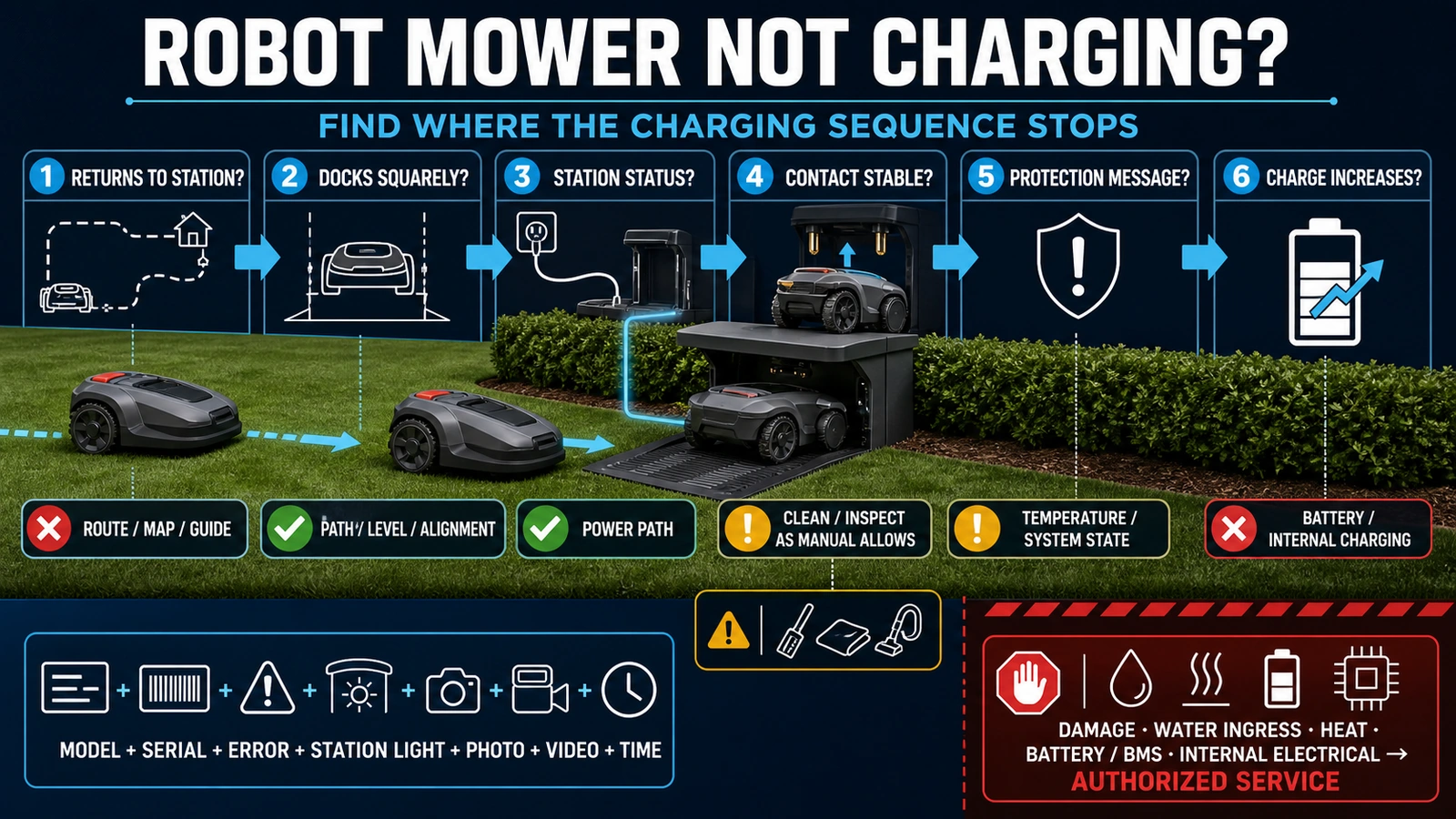
- First separate a mower that cannot find or dock with its station from one that is docked but not receiving charge.
- Check station power, docking alignment, accessible contacts, temperature or protection messages and post-storage condition before assuming the battery has failed.
- Record the model, error, station light, battery percentage and docking behavior; leave damaged power equipment, batteries, BMS and internal charging circuits to qualified or authorized service.
In this article 17 sections
First separate two problems: a mower that cannot return to its charging station, and one that is docked but will not charge. The first points to the return route or docking; the second calls for checks of power, contacts, temperature messages and the model's charging procedure.
Record the error, station light and battery percentage before changing anything. Use the exact model's manual, and leave damaged power equipment, batteries and internal circuits to authorized service.
Robot Lawn Mower Not Charging: What to Check First
| What you observe | Main area to investigate | First safe action |
|---|---|---|
| Mower stops on the lawn with an empty battery | Return route, guide wire, virtual map, operating mode, obstacles or station location | Preserve the error and watch where the return attempt fails |
| Mower reaches the station but repeatedly reverses and retries | Docking path, station level, baseplate, alignment, debris or contact geometry | Power down as instructed and inspect the physical approach |
| Mower is docked but the station has no light or status | Outlet, site protection, external cable, power supply or station hardware | Stop and identify the exact power path; use qualified help for electrical checks |
| Station appears powered but charging does not begin | Seating, accessible contact surfaces, mower state or internal charging path | Record both station and mower indicators before reseating or restarting |
| Charging starts and stops intermittently | Unstable contact, station movement, contamination, oxidation, connector or internal fault | Note whether slight movement changes the status; do not force the contacts |
| Mower docks and then leaves before it is charged | Contact recognition, schedule or mode, station communication, battery or control condition | Record the departure time, battery level and exact status message |
| Temperature warning appears | Battery protection state, station exposure or internal temperature condition | Let the product follow its model-specific protection logic |
| Mower will not charge after storage | Storage procedure, deep discharge, battery protection or internal battery fault | Follow the exact post-storage recovery instructions and escalation point |
| It charges but runtime has fallen sharply | Battery health, cutting load, grass conditions, search time, settings or drive resistance | Compare charge time, runtime and return behavior over documented cycles |
This table is a diagnostic map, not a universal repair procedure. Similar lights and messages can mean different things on different brands and generations.
First Separate “Cannot Return” from “Cannot Charge”
A robot mower can report an empty battery even when the charging hardware is healthy. It may be unable to find the station, follow the required guide path, cross a mapped passage, enter the docking corridor or align with the contacts before its remaining energy is exhausted.
Husqvarna’s current Automower charging guidance lists guide-wire condition, station-search settings, operating mode, obstacles, stay-out zones and station installation among the possible reasons for an Empty battery message. Those are Automower examples, but the diagnostic principle is broader: establish whether the mower reached the charging interface before blaming the interface.
Watch one return attempt if it is safe to do so. Record:
- where the mower begins searching for the station;
- whether it follows a wire, virtual route, corridor or direct approach;
- whether a new obstacle, closed gate or edited stay-out zone blocks the path;
- whether it reaches the station and makes physical contact;
- how many docking attempts it makes;
- the battery percentage and error when it stops.
For a wire-free mower, return reliability can depend on the map, docking point, satellite or local positioning, network service and accessories as well as the physical station. Navimow’s MowGate error guidance is a product-specific example of an electronic passage affecting the ability to locate the station.
If the mower never reaches the contacts, troubleshoot the return and docking system. If it reaches the contacts but the charge state does not begin, move to station power and the charging interface.
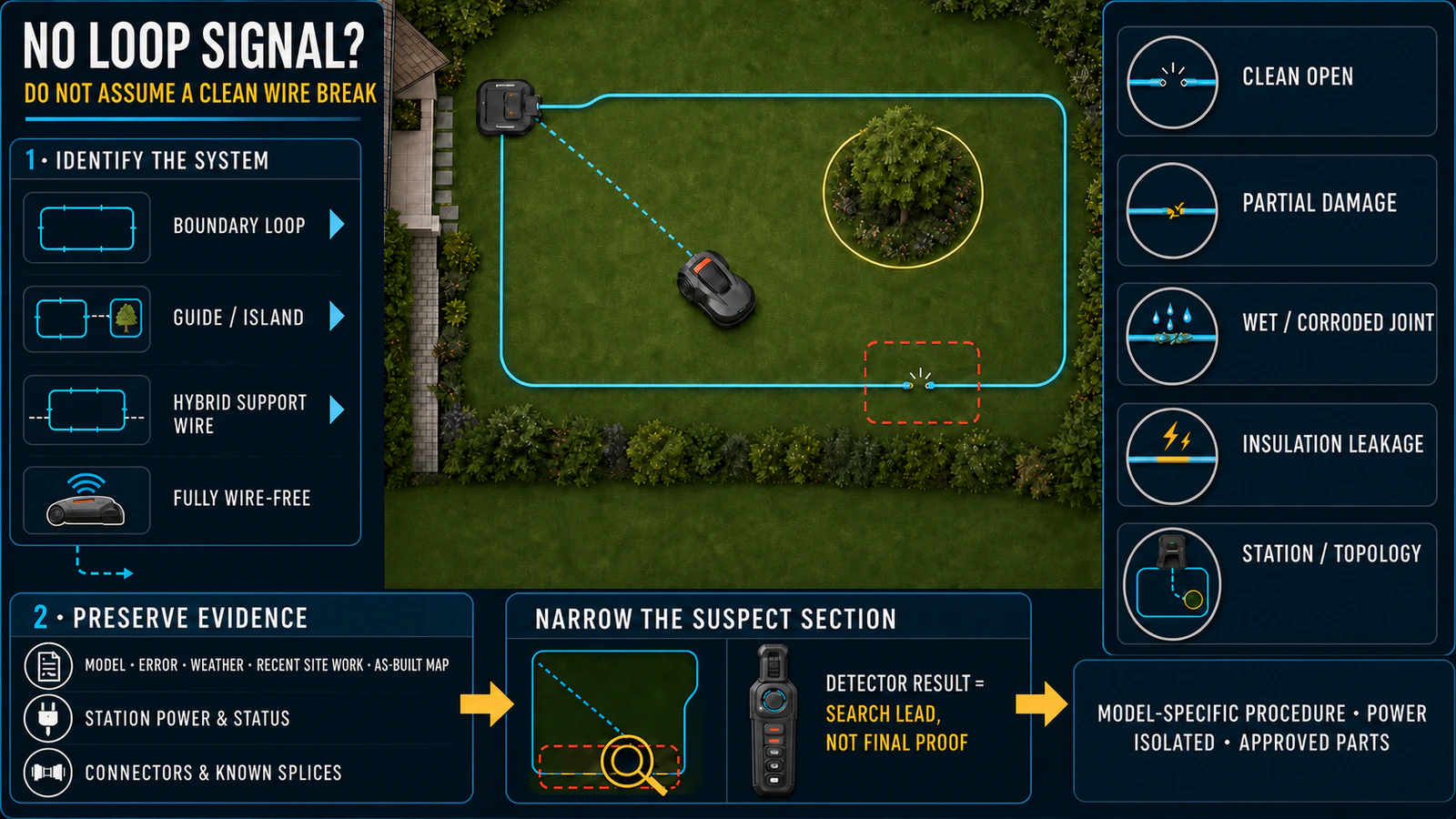
For a wired installation that reports a no-loop condition or cannot follow its normal return path, use the separate robot mower boundary-wire break guide. Do not apply boundary-wire procedures to a fully wire-free mower.
Record the Evidence Before Resetting Anything
The first service record should capture the state that exists before a restart removes it.
Record:
- brand, complete model, market version and serial number;
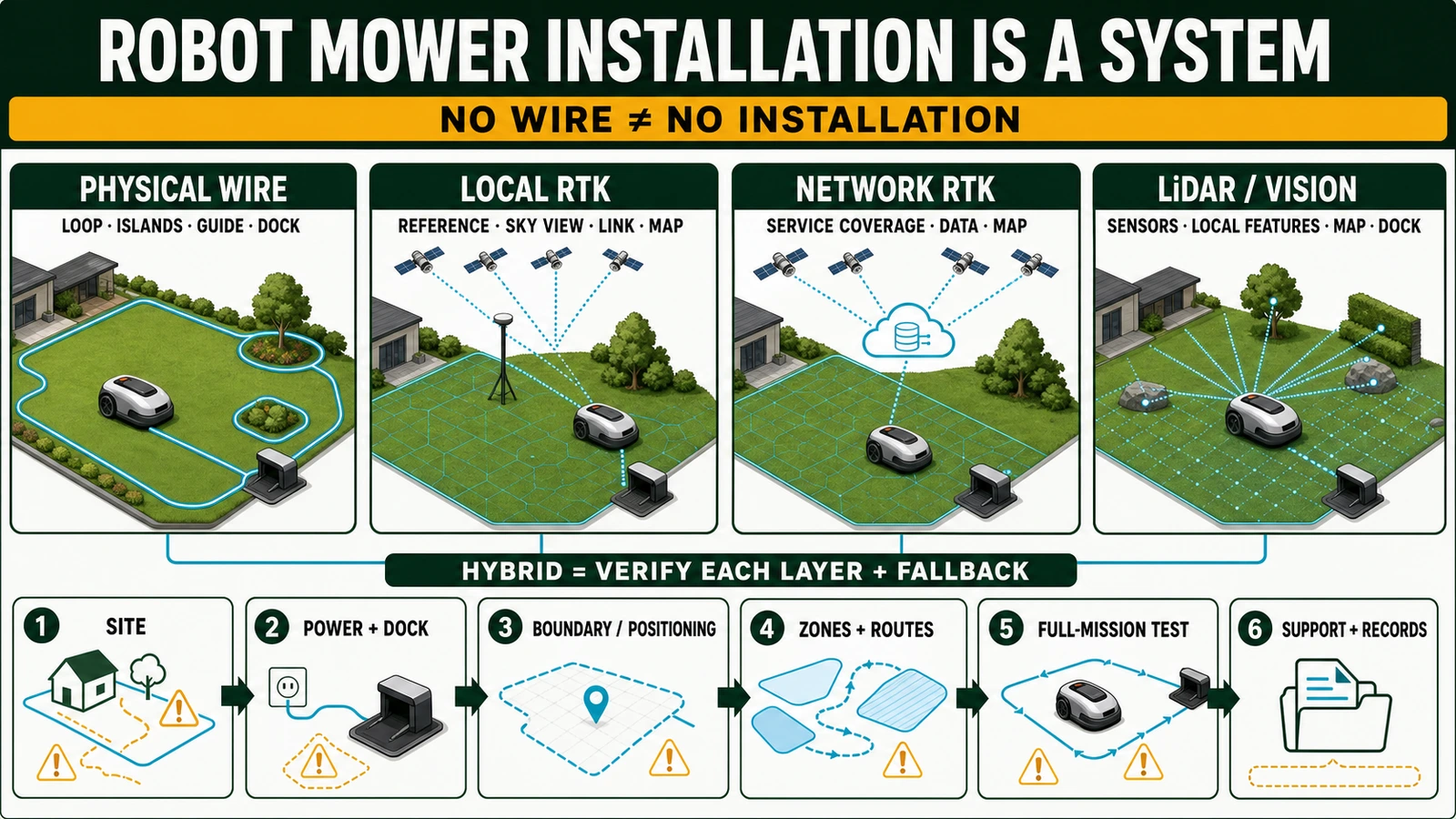
- wired, local-RTK, network-RTK, LiDAR, vision or hybrid installation where known;
- station, power-supply and battery part identifiers if accessible without disassembly;
- station light color and pattern, without interpreting it from another model’s manual;
- mower screen or App status and exact error code;
- whether the mower reached, touched and remained in the station;
- battery percentage before docking and whether it increases;
- time to failure and whether charging is continuous or intermittent;
- recent station movement, map change, landscaping, storm, flooding, service or winter storage;
- photos of the station, approach path and accessible contact surfaces;
- a short video of the final approach, docking attempt and indicator change.
Navimow’s current X4 station-support page asks for the serial number, exact time and a photo when basic checks do not restore the station. A dealer or importer can standardize the same evidence fields across its own portfolio while keeping each brand’s technical procedure separate.
Safety Before Charging-System Checks
Outdoor power, water, metal contacts and lithium-ion batteries require a clear boundary between observation and repair.
- Stop and switch off the mower using the exact procedure before touching accessible charging surfaces or removing debris.
- Disconnect the station from power before cleaning it when the manual requires isolation.
- Do not work on wet or visibly damaged power equipment.
- Do not open a power supply, station, mower enclosure, battery pack or battery-management system.
- Do not bypass temperature, charging, communication or battery protections.
- Do not use a charger or power supply merely because its connector fits.
- Do not probe live outdoor contacts or improvise a cross-brand voltage test.
- Stop immediately for damaged insulation, water ingress, swelling, smoke, unusual heat, repeated protection trips or a burnt smell.
The STIHL iMOW 5/6/7 EVO manual instructs users not to operate damaged mower, battery, station, charging cable, power supply or connecting cable and to contact an authorized dealer. The exact isolation and service procedure still depends on the model and market.
Check Whether the Charging Station Has Power
Follow the complete external power path:
`site supply and protection → manufacturer power supply → low-voltage cable and connectors → charging station → charging interface`
A dark station can result from an upstream outage, a disconnected or damaged external cable, a failed power supply or a station fault. It does not identify which component has failed.
Husqvarna’s station-light guidance separates the outlet, low-voltage cable connections, cable damage, power-supply compatibility and station damage. Dreame’s 2026 mower charging page likewise begins with the station indicator and external power before moving to alignment and contacts.
At operator level, check only visible status and connections assigned to the user by the exact manual. Site electrical supply, protective devices, damaged cables, suspect adapters and internal station components belong to qualified personnel or authorized service. A working station light confirms a status defined by that model; it does not prove that the complete charging path will work under load.
Do Not Use a Universal Charging-Station Light Chart
LED colors are not standardized across robot mower brands or even necessarily across generations of one brand. A green, blue, yellow or red light can describe power, charging, loop signal, positioning, communication, Eco mode or a fault depending on the product.
Use this order:
- Identify the full mower and station model.
- Open the matching manual or current official support page for the market version.
- Record color, whether it is solid or flashing, and its timing.
- Interpret it only with that product’s legend.
- Escalate an undocumented or persistent fault state with the original evidence intact.
This prevents a dealer from applying one familiar brand’s light table to a different station architecture.
Check the Docking Path and Physical Alignment
The mower must approach the station at the expected angle, travel onto a stable base and seat the charging interfaces with the required pressure. A station can have power and clean contacts yet still fail because the mower never aligns correctly.
Inspect, within the operator and installer boundaries:
- leaves, grass clippings, toys, branches or other debris in the approach;
- new edging, ruts, settlement, wheel tracks or soft ground near the base;
- a tilted, bent, loose or displaced station base;
- a moved station whose map or docking point was not updated;
- a guide wire, virtual path or access corridor affected by landscaping;
- a gate, stay-out zone or accessory that blocks the return path;
- whether the mower stops squarely or remains visibly offset.
Husqvarna’s Charging station blocked guidance links repeated docking attempts to obstacles, uneven ground, contact condition, guide-wire layout and station faults. Its distances and adjustment instructions are model-specific; the cross-brand lesson is to inspect the path, foundation and final contact as one system.
An installer should repeat the return from representative parts of the work area after moving a station, changing the map or repairing a guide path. Manually pushing the mower onto the dock proves only that contact may be possible; it does not prove autonomous return and docking.
Inspect Accessible Charging Contacts
Grass residue, soil, dust, oxidation and corrosion can raise resistance or prevent a stable interface. Spring-loaded or flexible station contacts can also lose movement or alignment. The approved material and method for cleaning or replacing them varies by product.
Use the exact manual to determine:
- whether the contact is user-cleanable;
- whether the mower and station must be isolated first;
- which dry brush, cloth, abrasive or cleaner is allowed;
- whether water may be used on that station version;
- what wear, corrosion, bending or loss of spring action requires replacement;
- whether the part is sold separately or only as an assembly.
The eufy E15/E18 support page describes dirt, oxidation and poor contact at both the mower and base for those models, then moves unresolved internal charging-module or circuit faults to support. Husqvarna’s cleaning guidance explicitly distinguishes which of its models permit running water and prohibits high-pressure washing.
Do not turn one brand’s use of abrasive pads, alcohol, water or contact cleaner into universal advice. Over-cleaning can remove plating, change contact geometry, damage seals or affect warranty evidence.
Check Temperature and Protection States
A battery can be healthy and still refuse charge while a protection condition is active. Battery temperature, internal temperature sensing, station exposure and recent operating load can affect the charge decision.
If the mower displays a temperature or protection message:
- preserve the exact message;
- stop repeated forced restart attempts;
- check whether the station is exposed to unusual heat or direct sun;
- follow the model’s allowed operating, charging and storage conditions;
- allow the product to return to its permitted state;
- escalate a recurring message that appears under normal conditions.
Husqvarna’s 2026 temperature guidance says Automower pauses operation when battery temperature is outside its accepted range and normally resumes when the condition clears. The numerical range belongs to Husqvarna products and should not be presented as a category standard.
If the Mower Will Not Charge After Winter Storage
For seasonal preparation and restart checks, see the robot lawn mower maintenance and winter storage guide. Post-storage failures need the manual for the exact battery and generation. Storage charge, indoor or outdoor treatment, station storage, reconnection sequence and recovery time vary.
A mower stored at an unsuitable state of charge may arrive at spring commissioning deeply discharged. Corrosion, moisture, rodent damage, disconnected station equipment, changed landscaping and outdated software can create separate symptoms at the same time.
Use a controlled recommissioning record:
- Inspect the mower, station, power supply and visible cables for damage before energizing them.
- Reassemble only the components and connections specified for that installation.
- Restore the station and check its exact model status.
- Follow the manufacturer’s post-storage charging process.
- Record whether the mower powers up, accepts charge and increases battery percentage.
- Stop if the approved recovery process fails or the battery, station or power equipment behaves abnormally.
Husqvarna’s current charging page notes that a mower stored without the required charge may be too deeply discharged to begin normally. That is a brand-specific recovery context, not permission to leave every unresponsive battery on charge indefinitely.
When Charging Starts but Stops Early
Intermittent charging is often more useful diagnostically than a complete no-power condition. Record what changes at the moment charging stops:
- Does the station indicator change?
- Does the mower shift or lose physical contact?
- Does battery percentage rise before stopping?
- Does an error, temperature warning or communication message appear?
- Does reseating restore charging temporarily?
- Does the problem occur after rain, irrigation, mowing debris or station movement?
- Is the charging time or runtime trending down across cycles?
A one-time restart is not a repair record. Repeatedly reseating the mower can hide a worn contact, unstable base, connector, station board, battery or internal charging problem. If charging depends on pressure, manual positioning or repeated restarts, keep the mower out of unattended service until the interface is assessed.
Battery Age Is Only One Possible Cause
Battery capacity normally changes with use, temperature, duty, terrain, cutting load, search time and storage. A tired battery may show shorter mowing intervals, early returns, longer or incomplete charging, or failure under load. Those observations are not proof that the battery pack itself is the only failed component.
Compare four records:
| Record | What it helps separate |
|---|---|
| Charge begins and percentage rises steadily | Station and interface can establish a charge at that time |
| Charge reaches the expected model-defined state | Acceptance of charge versus premature cutoff |
| Runtime under a comparable route and grass condition | Capacity/loads versus a display-only issue |
| Autonomous return, docking and restart | Complete system uptime versus bench charging alone |
World Clean Biz’s robot mower lifespan guide explains battery aging, replacement and service-life questions. This page owns diagnosis of a current charging failure, not a universal battery-life estimate.
Know When to Stop and Escalate
End operator troubleshooting when the problem moves beyond routine, power-isolated checks named in the manual.
Escalate when:
- the outlet, protective device, external cable or power supply is damaged or repeatedly trips;
- the station was affected by flooding, lightning, impact or internal corrosion;
- contacts are burned, loose, badly worn, bent or no longer spring correctly;
- the battery is swollen, leaking, unusually hot or emits an odor;
- water is suspected inside the mower, battery, power supply or station;
- an internal charging-module, BMS, control-board or communication fault is suspected;
- the mower charges only when held, pressed or repeatedly repositioned;
- the approved post-storage process does not recover the battery;
- a persistent error returns after documented external checks;
- the product is under warranty and further work could affect coverage.
Do not substitute a supposedly compatible adapter, battery or station before confirming the exact part number, electrical specification, firmware or communication requirement, market version and approval status.
Test the Complete Charging Cycle Before Release
A mower that charges once after being manually placed on the station has not passed an autonomous return-to-service test.
The acceptance test should cover:
- the station’s correct model-specific status;
- a stable physical installation and clear docking path;
- autonomous return from a representative part of the work area;
- repeatable alignment and contact without manual pressure;
- charge-state recognition and a sustained increase in battery percentage;
- no recurring temperature, communication, power or battery warning;
- a successful release from the station and representative mowing task;
- a second autonomous return and renewed charging state when site risk justifies it;
- a written record of action, parts, firmware, result and person releasing the asset.
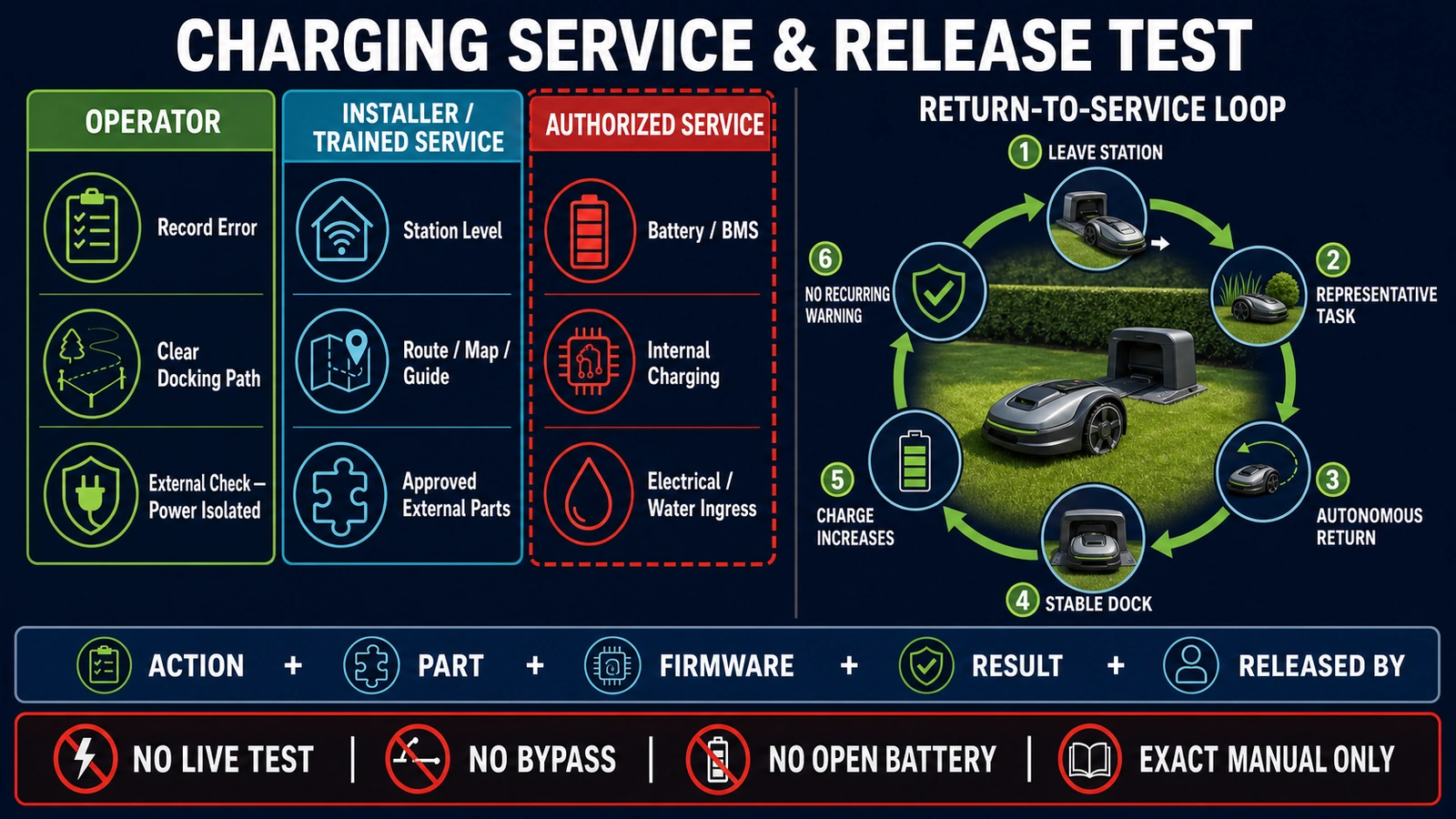
The exact charge target and cycle duration come from the product, not a category-wide number. The pass criterion is repeatable system behavior: reach the station, dock, charge, leave and return without an unresolved warning.
B2B Lessons for Dealers, Installers and Fleet Operators
A charging failure sits across product, site and service responsibility. A distributor or fleet owner should not manage it as a battery-only spare-parts request.
Commission the charging system at installation
The handover should document station location, power path, protection, cable routing, model-specific status, docking point, return paths, maps or guide wires, contact condition and representative return tests. World Clean Biz’s robot lawn mower installation guide covers the wider site project.
Build an exact-SKU parts map
Record the compatible power supply, low-voltage cable, station assembly, contact parts, connectors and battery. Similar-looking parts can differ in voltage, communication, weather protection, firmware or market approval.
Define the service boundary
The contract should distinguish:
- operator cleaning and observation;
- installer adjustment of the station, route, guide infrastructure or map;
- trained replacement of approved external components;
- authorized battery, BMS, internal electrical, sealing and control work;
- site electrician responsibility for the fixed outdoor supply;
- seller, importer or manufacturer responsibility for warranty and logistics.
Plan for seasonal uptime
In peak growth periods, the business impact is not the price of one battery. It includes missed mowing, manual recovery, travel, remote diagnosis, station parts, battery transport, repeat visits and replacement-machine availability. Commercial contracts should define response time, spare strategy, remote-log access, on-site scope and who pays when the cause is site infrastructure rather than the mower.
Keep the evidence needed for warranty and product improvement
Aggregate failure records by SKU, station type, installation architecture, climate, contact condition, firmware, battery age, return behavior and replaced part. That data helps distinguish a recurring product issue from weak site commissioning or maintenance.
FAQ
Why is my robot lawn mower docked but not charging?
The station may not have the expected power or status, the mower may not be seated correctly, accessible contacts may be dirty or unstable, a temperature or protection state may be active, or an internal station, battery or charging fault may exist. Record both station and mower indicators and use the exact manual before cleaning or resetting.
Why does my robot mower keep leaving the charging station?
It may not recognize a stable charging contact, the schedule or operating mode may call it away, station communication may be unstable, or a control or battery condition may interrupt charging. Record the battery percentage, status message and time of each departure.
Can dirty contacts stop a robot mower from charging?
Yes. Grass residue, soil, oxidation or poor alignment can prevent a stable connection. Clean only with the power-isolation and material specified for the exact mower and station. Do not assume another brand’s abrasive, solvent or water-cleaning method is safe.
Why does the mower show an empty battery before reaching the dock?
The battery may be low, but the immediate failure can be the return system: guide wire, mapped path, search setting, mode, obstacle, gate, stay-out zone or station installation. Confirm whether the mower reached the dock before diagnosing charging hardware.
Why will my robot lawn mower not charge after winter?
It may be deeply discharged, reassembled incorrectly, affected by storage damage or following a model-specific protection state. Use the exact post-storage procedure and stop if the approved process does not restore normal charging.
Can I test the charger with a multimeter?
Do not use live electrical measurement as a general user step. Outdoor charging systems differ, and exposed power equipment can be wet or damaged. Measurement and internal power diagnosis belong to appropriately qualified or authorized personnel using the model’s service information.
Should I replace the battery first?
Not before confirming return, docking, station power, contact, temperature and error evidence. A new battery will not repair a blocked docking path, damaged power supply, unstable contact, station board or communication fault.
When should I contact the dealer?
Contact the dealer or authorized service when external manual-approved checks do not resolve the fault, the product is under warranty, charging is intermittent, electrical damage or water ingress is suspected, the battery behaves abnormally, or the next step requires opening an enclosure.
Final Answer
When a robot lawn mower will not charge, diagnose the sequence rather than guessing the part. Confirm that it can reach the station, align and remain docked. Then check the station’s exact model status, approved external contacts, temperature or protection message and post-storage condition.
Preserve the error and service evidence before resetting the system. Leave outdoor electrical faults, damaged power equipment, batteries, BMS, internal charging circuits and water ingress to qualified or authorized service. Return the mower to use only after it can repeat the complete cycle: reach the station, dock, charge, leave and return without an unresolved warning.