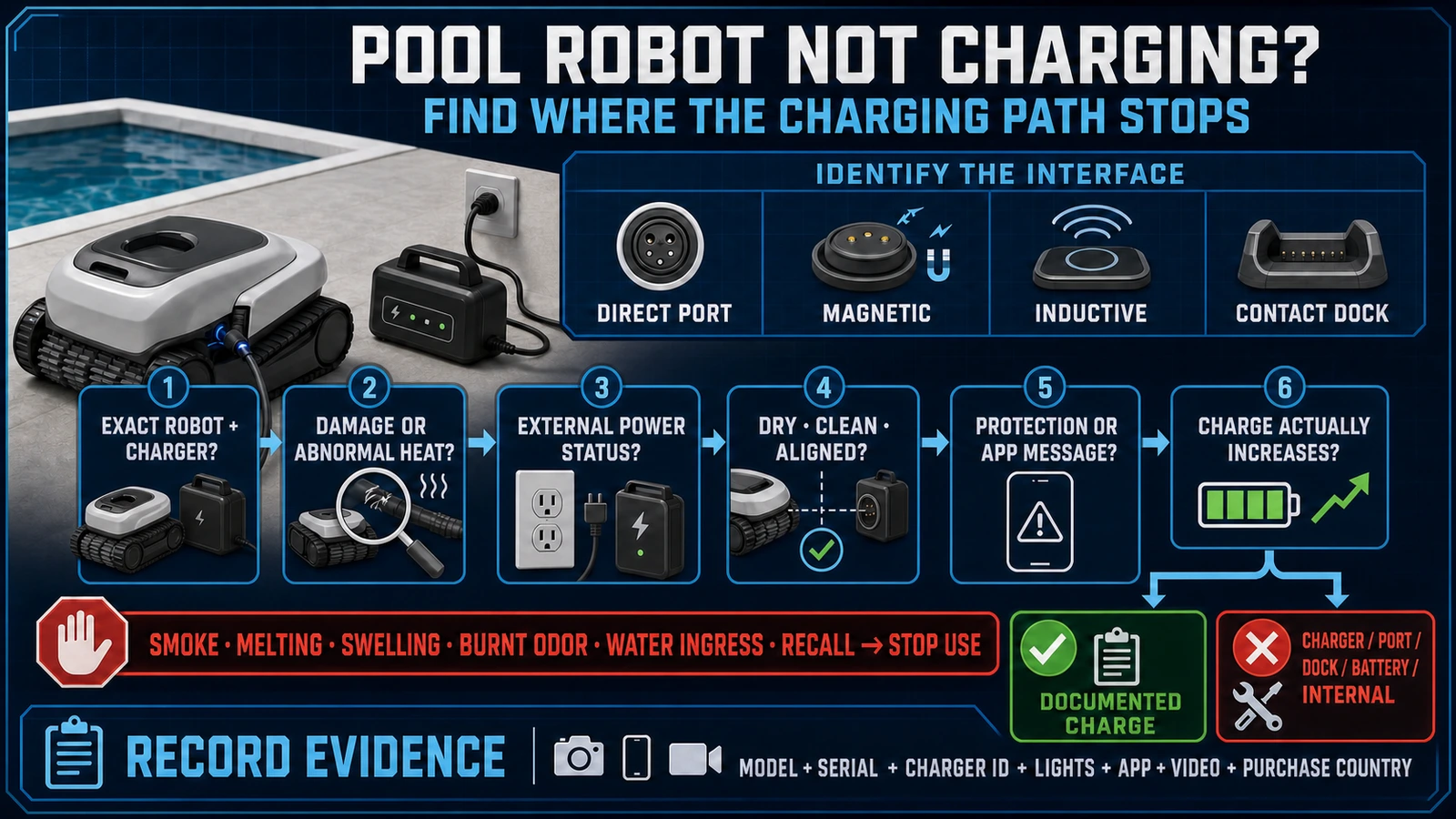
- A robotic pool cleaner that will not charge does not automatically need a new battery: identify the exact cordless architecture and locate where the charging path stops.
- Unusual heat, smoke, melting, swelling, burnt odor, water ingress or a matching recall moves the case out of ordinary troubleshooting and into an official safety or service process.
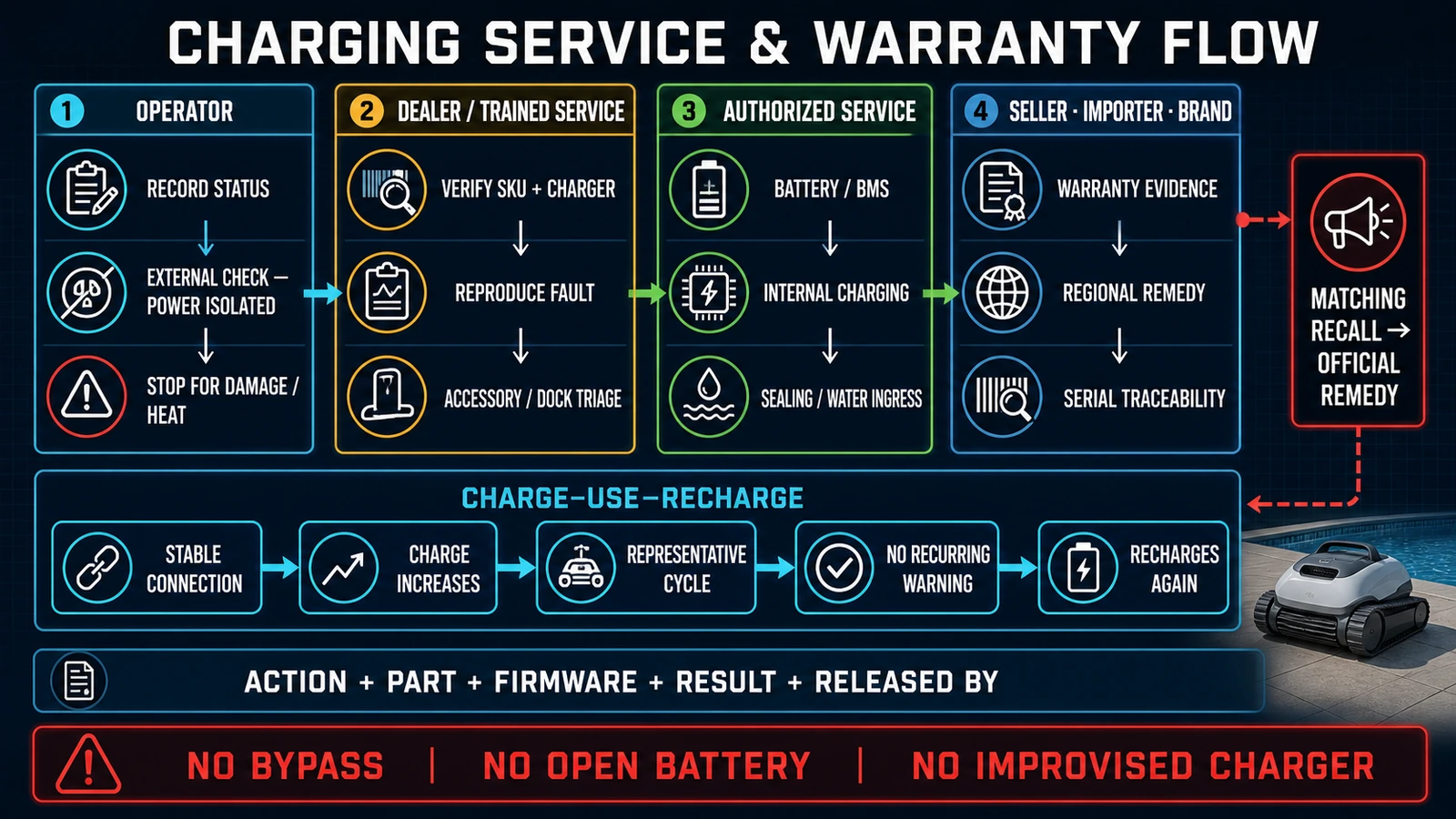
- Dealers should capture the exact SKU, serial number, charger identity, indicators, video and proof of purchase, then verify a complete charge-use-recharge cycle before release.
In this article 18 sections
If your cordless robotic pool cleaner is not charging, do not replace the battery first. Identify the exact model and charging system, then check for damage or abnormal heat before following the approved external sequence: wall power, original charger or dock, dry and clean charging surfaces, correct alignment, temperature or protection messages, and whether the displayed charge actually increases.
Stop ordinary troubleshooting if there is smoke, melting, swelling, a burnt smell, unusual heat, visible electrical damage or suspected water inside a sealed area. Disconnect power only if it is safe to do so, keep the product out of service and follow the manufacturer, seller, recall or emergency process that applies to the exact product.
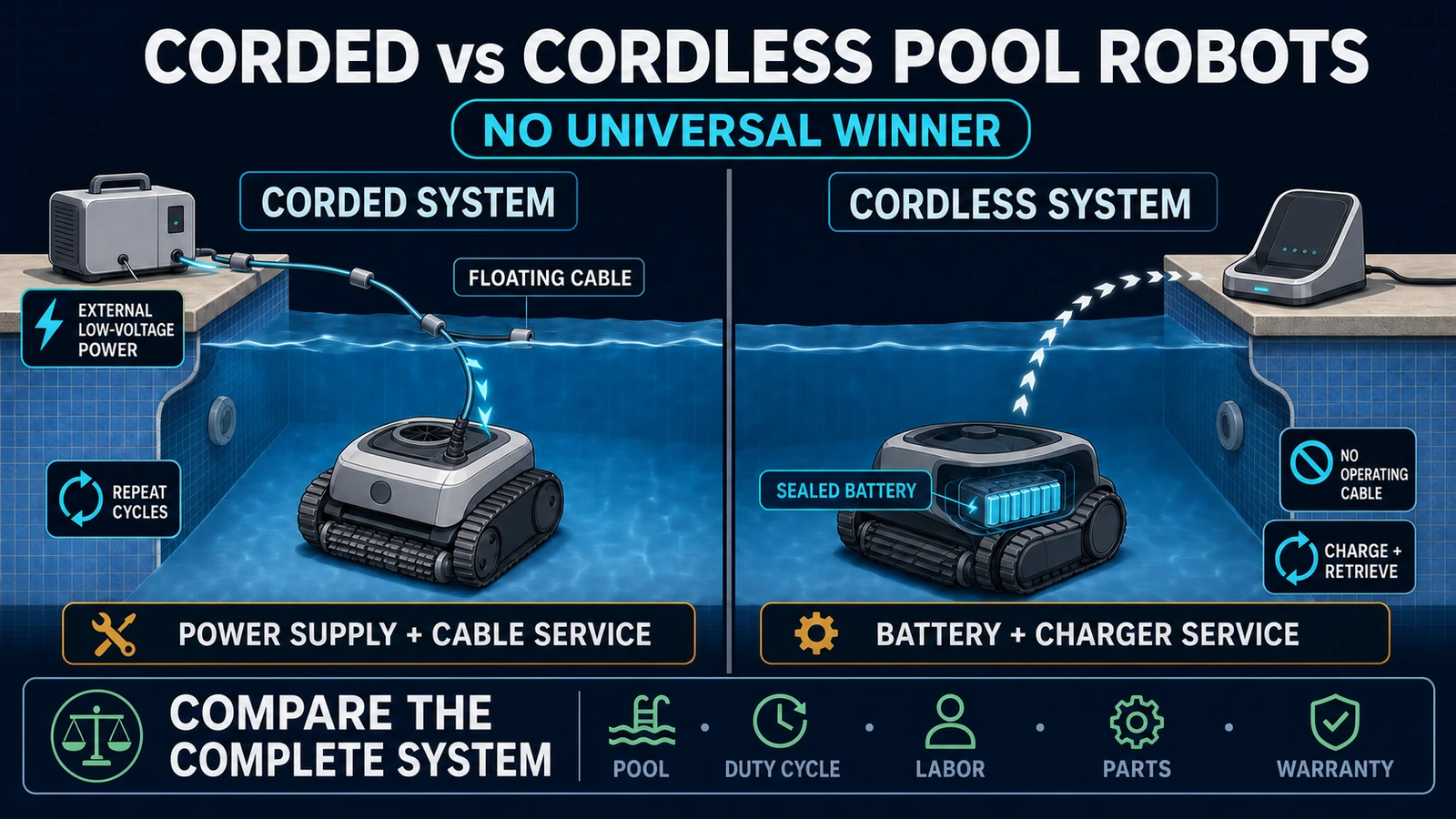
There is also an important definition problem. A traditional corded robotic pool cleaner does not recharge an onboard traction battery between cycles. If a corded cleaner has no power, diagnose its outlet, poolside power supply, floating cable and machine connection under the correct manual. This guide focuses on cordless pool robots with a battery and charger.
Robotic Pool Cleaner Charging Problems at a Glance
| What you observe | Main area to investigate | First safe action |
|---|---|---|
| The product is actually corded | Poolside power supply, cable or machine power path | Use the corded power troubleshooting section of the exact manual |
| Charger or dock shows no status | Outlet, protective device, power lead, adapter or dock | Record the state and follow the model’s approved external power check |
| Charger has status but the robot shows nothing | Connection, alignment, wet or contaminated surface, incompatible charger or internal fault | Power off and inspect only the accessible interface allowed by the manual |
| Robot indicates charging but the percentage does not rise | Display lag, software state, temperature protection, unstable contact, charger or internal charging path | Record the starting percentage, time and every indicator before resetting |
| It immediately reports full but runs only briefly | Display or calibration issue, incomplete charge, load-related runtime loss, battery degradation or internal fault | Separate charge-state evidence from a supervised runtime test |
| Charging starts and stops when the product is moved | Port, cable, magnetic adapter, dock alignment, contacts or damaged connection | Stop manipulating it under power; inspect for visible damage after isolation |
| High- or low-temperature message | Model-specific charge protection | Move to the permitted charging environment and follow the exact manual |
| Heat, smoke, melting, swelling or burnt odor | Potential battery, charger or electrical hazard | Stop use and enter the official safety, recall or authorized-service process |
| No charge after storage | Storage state, deep discharge, charger, protection or battery condition | Use the exact post-storage procedure; do not attempt a BMS bypass |
This is a triage table, not a universal repair chart. LED colors, charge time, temperature range, electrical values, reset method and permitted cleaning materials vary by model.
First Confirm That the Robot Is Cordless
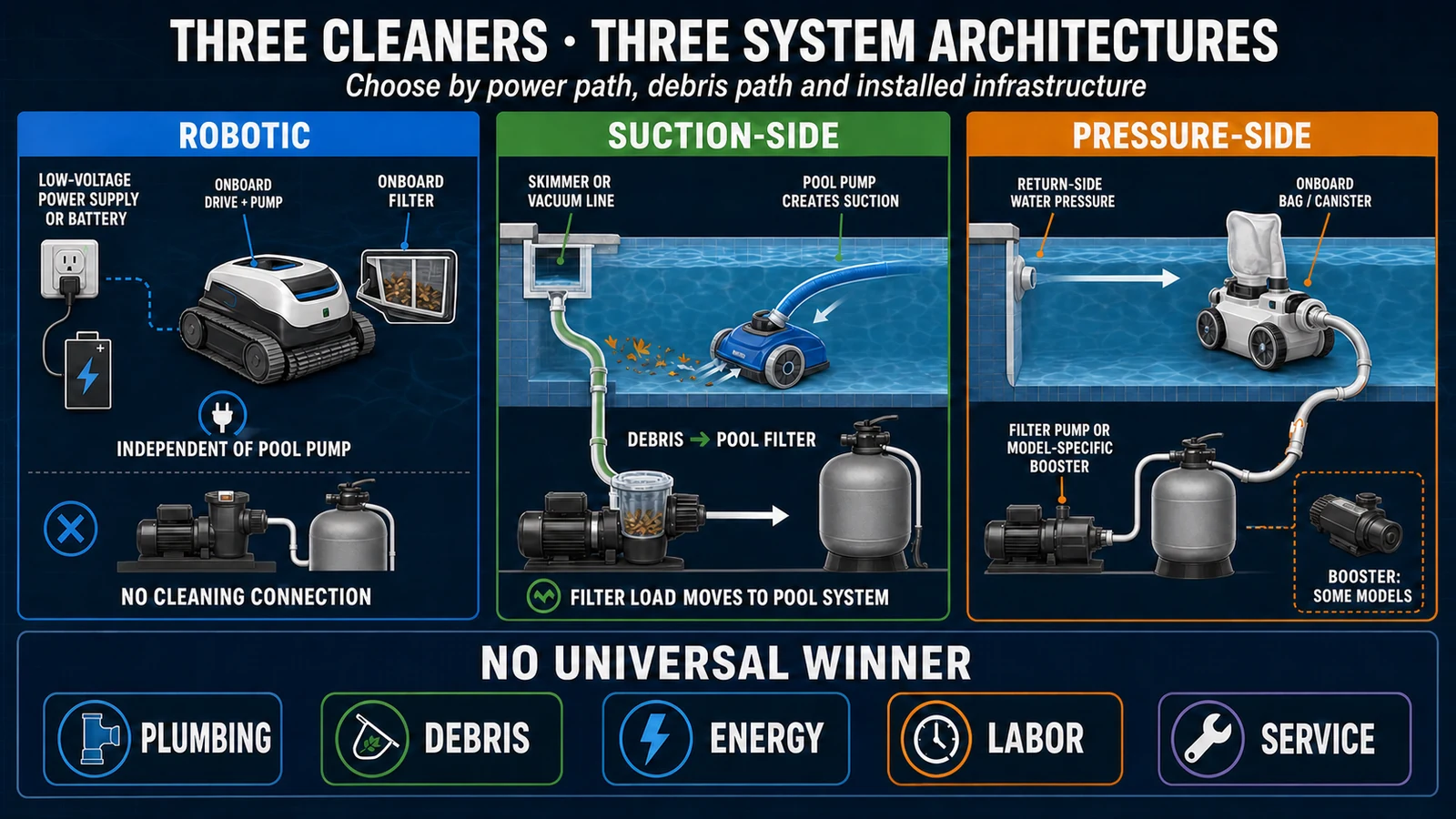
The phrase “robotic pool cleaner not charging” is meaningful for a battery-powered product. It is often misapplied to corded robots, suction-side cleaners and pressure-side cleaners.
A corded electric robot normally receives low-voltage power from a poolside power unit through a floating cable while it cleans. A cordless robot stores energy in an onboard battery and recharges outside the water through a plug, magnetic connection, inductive coupler or charging dock. Suction- and pressure-side cleaners depend on the pool circulation system instead of either architecture.
World Clean Biz’s cordless versus corded robotic pool cleaner guide compares these systems, while the robotic, suction and pressure cleaner guide separates the three cleaner types.
Do not apply a battery reset to a corded machine or diagnose a pool pump when a self-contained cordless robot will not charge. Correct system identity is the first diagnostic step.
Identify the Exact Charging Architecture
Cordless does not describe one charging design.
| Charging architecture | Current product example | Main external dependency | Common diagnostic mistake |
|---|---|---|---|
| Direct plug or covered charging port | Used across many cordless pool robots | Correct adapter, dry port and undamaged connector | Using a charger because the plug appears to fit |
| Magnetic adapter | Dreame Z1/Z1 Pro | Dry interface and intact magnetic adapter | Treating an adapter fault as proof of battery failure |
| Inductive coupler | Maytronics Dolphin Liberty | Clean coupling surfaces, correct placement and original charger | Assuming there must be exposed metal contacts |
| Contact charging dock | Beatbot AquaSense series | Powered dock, correct seating and stable contact | Declaring the battery failed before checking dock power and alignment |
Dreame’s current Z1/Z1 Pro charging support tells owners to dry excess water from the charging port and lists a damaged magnetic adapter as a separate possibility. Maytronics’ Liberty manual describes an inductive charger. Beatbot markets a contact charging dock for named AquaSense products.
These examples establish that the interfaces differ. They do not create one cleaning method, indicator chart or charger compatibility rule for the entire category.
Record the complete robot model, market version and charger or dock part number before any replacement is ordered. A compatible-looking connector is not evidence of compatible voltage, current, control logic, sealing or safety protection.
Record the Failure Before Resetting Anything
Charging evidence often disappears after a restart, App re-pairing or prolonged connection to the charger. Capture the original behavior first.
Record:
- exact model, market version and serial number;
- purchase country, seller and proof of purchase;
- charger, adapter or dock model and visible label;
- whether the robot was corded or cordless;
- charger/dock status and robot status before connection;
- every light pattern, message, sound and App battery percentage;
- battery percentage at connection and after a controlled interval permitted by the manual;
- charging location and approximate ambient condition;
- whether the robot and charging interface were dry;
- visible corrosion, deformation, impact or damaged insulation;
- whether the fault changes when the product is seated normally, without forcing it;
- last successful charge, storage history and recent firmware change;
- a short video showing the charger, robot indicator and failure.
iGarden’s current M1-AI support page separates a dark charger, a lit robot with no battery increase, an immediate full indication and an App mismatch. It also asks customers for a video of the robot indicator and a photo of the charger light.
That is a useful service principle: preserve observable evidence. Its specific waiting time, temperature and restart steps remain model-specific.
Safety Gate: Know When to Stop
Normal external troubleshooting is appropriate only when the product and charging equipment appear intact and the exact manual allows the check.
Stop using and charging the product if you observe:
- smoke, flame, melting or a burnt smell;
- a swollen, cracked or deformed enclosure;
- unusual or recurring heat during charging;
- damaged insulation, plug, adapter, cable or dock;
- water where the manual says the charging area must be dry;
- suspected liquid inside a sealed electrical compartment;
- repeated battery-temperature or internal charging warnings;
- a product that matches an official stop-use or recall notice.
Do not open, crush, puncture or bypass a sealed lithium battery. Do not bridge a contact, defeat a temperature interlock, substitute an improvised charger or use a live electrical test as a general poolside DIY procedure.
Maytronics’ current Liberty charger guidance says not to use a damaged charger or a mechanically damaged robot or battery. It also requires the original charger and keeps the charging equipment outside the water.
The safety gate is not theoretical. In March 2025, the U.S. CPSC recalled Aiper Seagull Pro ZT6001 units because a large power adapter could overheat. The notice covered about 32,660 units in the United States and about 2,530 in Canada; it reported 19 melting, smoking or fire incidents and five cases of property damage, with no reported injuries. The remedy was to stop use and obtain a replacement.
That recall applies to the identified model and remedy—not every Aiper product or every cordless pool robot. It demonstrates why a heat or melting complaint must not be reduced to “try another charger.”
Check the Outlet and Approved External Power Path
If there is no hazard or recall stop condition, begin outside the robot.
Use the exact manual to confirm:
- the required outlet and protective device;
- the correct market-specific charger, adapter or dock;
- the normal charger or dock status before the robot is connected;
- the required placement away from the pool and water;
- whether extension cords, adapters or outdoor exposure are prohibited;
- the model’s approved charging environment.
If the outlet or protective device is uncertain, use an appropriate qualified person or the safe check specified by the manufacturer. Do not dismantle a charger or expose live contacts.
A charger light can confirm that part of the external path has power. It does not prove that the output, connection, robot charging circuit, BMS and battery are all functioning. Conversely, a dark status light does not prove the robot battery is defective.
For dealer intake, record both sides of the transaction: the charger state without the robot and the robot state after normal connection. This prevents a complete-unit return when the failure is an external accessory—and prevents repeated charger replacement when the fault is inside the robot.
Inspect the Charging Interface Only as the Manual Allows
Pool robots move between treated water and electrical charging equipment. Water, salt residue, debris and physical wear can affect an accessible interface, but the approved treatment depends on its materials and design.
After power isolation:
- verify that a port or surface is as dry as the exact manual requires;
- remove only visible loose debris with the approved method;
- inspect for corrosion, bent parts, cracking or deformation;
- confirm that a magnetic coupler or dock is seated normally;
- check that no object prevents an inductive surface from aligning;
- stop if connection requires force or works only when held at an angle.
Do not copy another brand’s solvent, abrasive, brush or water-cleaning method. A metal contact, coated magnetic interface and inductive surface are not interchangeable.
The 2023 CPSC Aiper Elite Pro GS100 recall involved a charging connection condition that could allow the battery to overheat and short circuit. About 22,000 units were included in the U.S. notice. The case reinforces a basic rule: a connection that can physically be made is not automatically an approved charging configuration.
Temperature and Protection States
Lithium-battery charging is controlled by model-specific protection logic. A robot can refuse, pause or alter charging when it is too hot, too cold or in another protected state.
Dreame’s Z1/Z1 Pro support tells users who receive a high charging-temperature message to unplug the charger, move the robot to a cool place, restart after waiting and contact after-sales support if the condition remains. iGarden’s M1-AI page describes a low-temperature protection case. Maytronics publishes a permitted charging range for Liberty.
Those are three model-scoped instructions. Do not convert any one temperature, waiting period or restart into a category rule.
Use this sequence:
- record the exact temperature or protection message;
- stop charging if the product reports excessive heat or behaves abnormally;
- move the intact product to the permitted environment specified by its manual;
- allow the model-defined recovery process;
- escalate a recurring protection event instead of cycling it repeatedly.
A temperature message is evidence of a system state. It is not proof that the battery cells are permanently damaged, and it is not permission to bypass the protection.
Indicator Lights and App Percentages Are Evidence, Not Proof
Charging status can be represented by the charger, robot, App or a combination. These layers can disagree.
Separate four observations:
- connection detected: the robot or charger reacts when connected;
- charging state displayed: a light or App says charging;
- stored energy increases: the battery percentage or usable runtime rises;
- charge remains stable: the robot can complete a representative task without an abnormal warning.
An indicator that says “full” immediately after connection can reflect a display, software, contact or battery-system problem. A percentage that rises without stable runtime does not prove the battery is healthy. A charger that stays lit does not prove the robot accepted charge.
Record the values before resetting the App or firmware. If the exact support procedure permits re-pairing or restarting, document the result before and after. Persistent disagreement belongs in the service ticket.
If It Charges but Runs for Only a Short Time
“Not charging” and “not holding a charge” are related but different complaints.
Short runtime after an apparent full charge can result from:
- incomplete or interrupted charging;
- an incorrect displayed state;
- battery degradation or imbalance;
- temperature protection;
- high operating load from a full filter, repeated climbing or obstruction;
- an internal power, motor or control fault.
Do not judge battery health from one unloaded power-on test. Record the selected mode, pool conditions, filter load, actual run time, end message and remaining percentage during a supervised representative cycle.
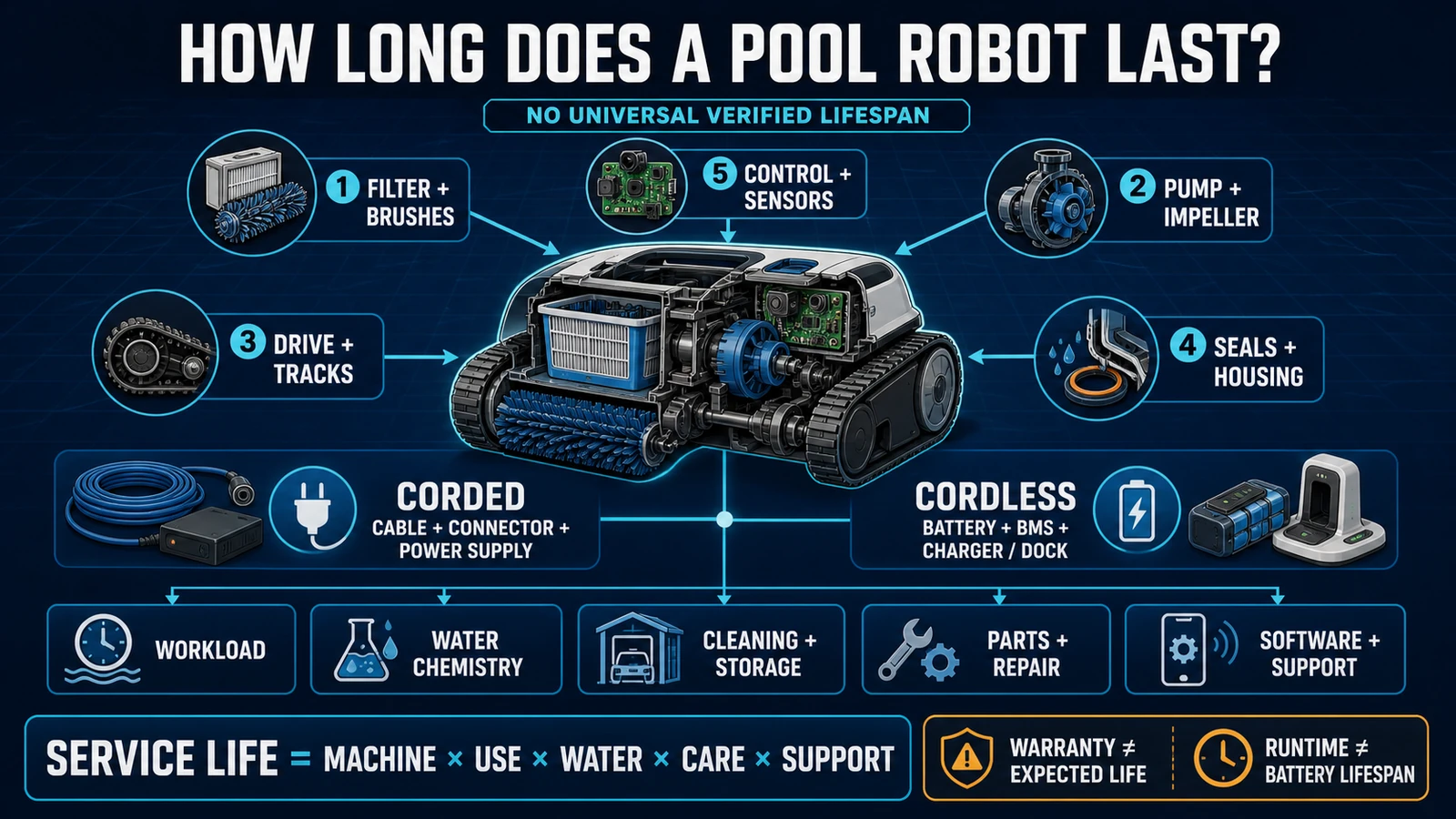
World Clean Biz’s robotic pool cleaner lifespan guide owns long-term battery aging, service life and repair-versus-replace economics. This page owns the diagnosis of a current charging complaint.
If runtime remains far below the exact model’s documented behavior after an approved full charge and controlled test, escalate with evidence. Do not publish or use a universal “battery must last X years” threshold.
If the Robot Will Not Charge After Storage
Off-season storage can introduce a different failure pattern. The battery may be deeply discharged, the charger or accessory may have been stored separately, contacts may have changed condition, or the product may be outside its permitted temperature range.
Use the exact post-storage instructions. Maytronics’ Liberty manual, for example, recommends a model-specific storage charge state and a full charge after storage. That does not establish a universal percentage for every battery pack.
Do not attempt to wake a sealed battery with an improvised supply, direct cell connection, repeated incompatible charger or BMS bypass. If the approved charger and post-storage procedure do not restore normal charging, treat it as a battery or internal-service case.
For commercial fleets, record storage date, stored charge state, location, inspection date and first successful recharge. Seasonal failure patterns are easier to manage when they are visible across serial numbers.
Should You Replace the Battery First?
No. A battery replacement will not repair a dead outlet, failed adapter, damaged dock, unstable connection, temperature lockout, software display problem or internal charging circuit.
Battery service also differs by product. Maytronics’ current Liberty manual describes its lithium-ion battery as non-replaceable by the user. Other manufacturers may use authorized battery service, module replacement or complete-unit exchange.
Before ordering a battery, confirm:
- exact SKU and serial number;
- whether the battery is user-, dealer- or factory-serviceable;
- whether opening the enclosure affects waterproof validation or warranty;
- battery and charger part numbers;
- who performs sealing and post-repair safety testing;
- whether the product or charger is under recall;
- return, transport and disposal instructions from the responsible service party.
Do not advertise a replacement pack as compatible based only on connector shape, nominal voltage or physical size. The pack, BMS, charger, firmware and sealed enclosure are one safety system.
Warranty Responsibility Is Part of the Diagnosis
A charging claim can involve several entities:
| Entity | Possible responsibility | Evidence required |
|---|---|---|
| Retailer or contract seller | Initial remedy, proof of sale, return or local consumer obligation | Invoice, order, SKU and purchase date |
| Importer or regional distributor | Market placement, local service, recall communication or parts channel | Market version, serial number and destination country |
| Brand warranty provider | Warranty decision, repair, replacement or support process | Authorized-channel proof, fault evidence and product registration if required |
| Manufacturer or authorized service center | Internal diagnosis, battery, BMS, sealing and electrical repair | Complete unit, service history, logs and approved procedure |
| Facility or fleet operator | Correct use, charging environment, maintenance and asset records | Operator log, location, cycle and incident evidence |
The responsible company is not automatically the name printed most prominently on the robot.
Aiper’s current U.S. refund and warranty policy lists different periods for named products and separately identifies accessories such as adapters and charging docks. It also ties claims to authorized purchase evidence and the country of receipt. Dreame’s current after-sales policy lists the pool robot, magnetic charger and battery pack as distinct covered components and refers customers to its team or an authorized distributor or retailer.
These are examples of regional policies, not universal coverage promises. Buyers should retain the version that applied to the transaction and confirm who performs the remedy in the destination market.
The 2025 CPSC notice also identifies Dongguan Yuanhong Intelligent Technology as manufacturer and Shenzhen Aiper Intelligent as distributor for the recalled Seagull Pro units. That distinction matters for traceability: manufacturer, distributor, seller and warranty operator can be different legal entities.
Build a Complete Service Evidence Pack
A dealer should not accept “battery dead” as a complete ticket.
Require:
- exact SKU, market version and serial number;
- charger, adapter or dock part number;
- seller, invoice and purchase country;
- charger and robot indicators before and after connection;
- App message, battery percentage and firmware version;
- a video of the normal connection and failure;
- photos of the interface and visible labels;
- charging environment and whether the surfaces were dry;
- last successful charge and storage history;
- any heat, odor, deformation, water or damage evidence;
- recall check result;
- every approved action already taken and its result.
This package lets the service team distinguish accessory replacement, complete-unit exchange, internal repair, misuse, shipping damage and recall remedy. It also reduces repeated customer instructions that erase the original symptom.
Test the Complete Charge–Use–Recharge Cycle
A robot is not ready for release merely because one light changes.
After an approved correction or authorized repair, run a controlled acceptance sequence:
- confirm the exact charger and normal charging environment;
- verify that the robot connects without force and enters the expected state;
- confirm that stored charge increases according to the model’s indicators;
- complete a supervised representative cleaning cycle;
- record runtime, warnings, final battery state and retrieval;
- return the robot to the charger using the normal process;
- confirm that charging begins and remains stable again;
- record the action, part, firmware, result and person releasing the unit.
Stop the test if heat, smell, damage, water ingress or a recurring protection message appears. A product subject to a stop-use recall follows the recall remedy, not this acceptance test.
B2B Procurement and After-Sales Lessons
Treat the charger as a serialized service component
Record the charger, adapter or dock SKU with the robot. If several product generations use similar connectors, segregate inventory and label compatibility. A wrong accessory can create a no-charge complaint or a safety event.
Price the actual remedy model
Ask whether a battery fault leads to pack replacement, sealed-module repair, refurbished exchange or complete-unit replacement. Each model requires different inventory, freight, technician capability and warranty reserve.
Confirm regional warranty before launch
Document the legal warranty provider, permitted sales channel, destination geography, commercial-use permission, covered accessories, required evidence and turnaround target. A global brand page does not prove local service capacity.
Keep serial-to-customer traceability
A recall by exact model and serial range is difficult to execute if the distributor knows only total units sold. Link carton, machine, charger, invoice, reseller and end customer where law and contract permit.
Stock evidence tools, not only parts
Standard intake forms, video guidance, label photos, App-log instructions and controlled test records can reduce false battery replacements. Parts stock without diagnostic discipline simply moves the cost.
Monitor the failure pattern
Track no-status, intermittent-contact, temperature, short-runtime, adapter, dock, battery and internal-repair cases separately. Do not publish a failure rate until sales population, exposure time, claim definition and confirmed diagnosis are comparable.
FAQ
Why is my robotic pool cleaner not charging?
The failure can be in the outlet, approved charger, port or dock, alignment, temperature protection, software display, battery, BMS or internal charging circuit. Identify the exact model and architecture, record the indicators and follow its external sequence before replacing a part.
Why is the charger light on but the pool robot is not charging?
The light may show only that the charger has input power. The robot may not have a stable connection, may be in a protection state or may have a charger-output, port, battery or internal fault. Record both charger and robot status.
Can I use another charger if the plug fits?
No, not without explicit manufacturer approval for the exact model. Connector fit does not confirm electrical output, control logic, sealing or safety compatibility.
Should the charging port be completely dry?
Follow the exact manual. Some products require a dry port or surface; others use a specific rain-resistant or inductive design. Never assume that “waterproof robot” means its charger can be submerged or every interface can be connected wet.
Why does it say fully charged but run only briefly?
The display may be wrong, charging may have been incomplete, operating load may be high, or the battery or internal power system may be degraded. Use a supervised charge and representative runtime record rather than the icon alone.
Can cold or hot weather stop charging?
Yes, model-specific battery protection can pause or refuse charging outside its permitted conditions. Use the exact temperature range and recovery method in the manual; do not bypass the warning.
Can I replace the battery myself?
Only if the manufacturer explicitly provides a user replacement procedure for that exact product. Many pool robots use sealed batteries that require authorized service and post-repair sealing or safety validation.
When should I stop troubleshooting?
Stop for heat, smoke, melting, swelling, burnt odor, damaged electrical parts, suspected water ingress, recurring internal warnings or a matching recall. Keep the product out of service and use the official safety or authorized-service process.
What should a dealer ask for?
Ask for model, serial number, charger identity, purchase evidence, country, indicator video, App message, starting and later battery percentage, interface photos, storage history and recall status.
Final Answer
When a cordless robotic pool cleaner will not charge, diagnose the path instead of guessing the battery. Confirm the exact robot and charger, apply the safety gate, then move through external power, connection, alignment, temperature or protection state, displayed status and actual stored energy.
Keep every model-specific number and reset inside its own manual. Escalate batteries, BMS, internal charging electronics, water ingress and recurring heat to authorized service. For dealers and professional operators, close the case only after the robot completes a documented charge–use–recharge cycle and the responsible warranty or recall entity is clear.