
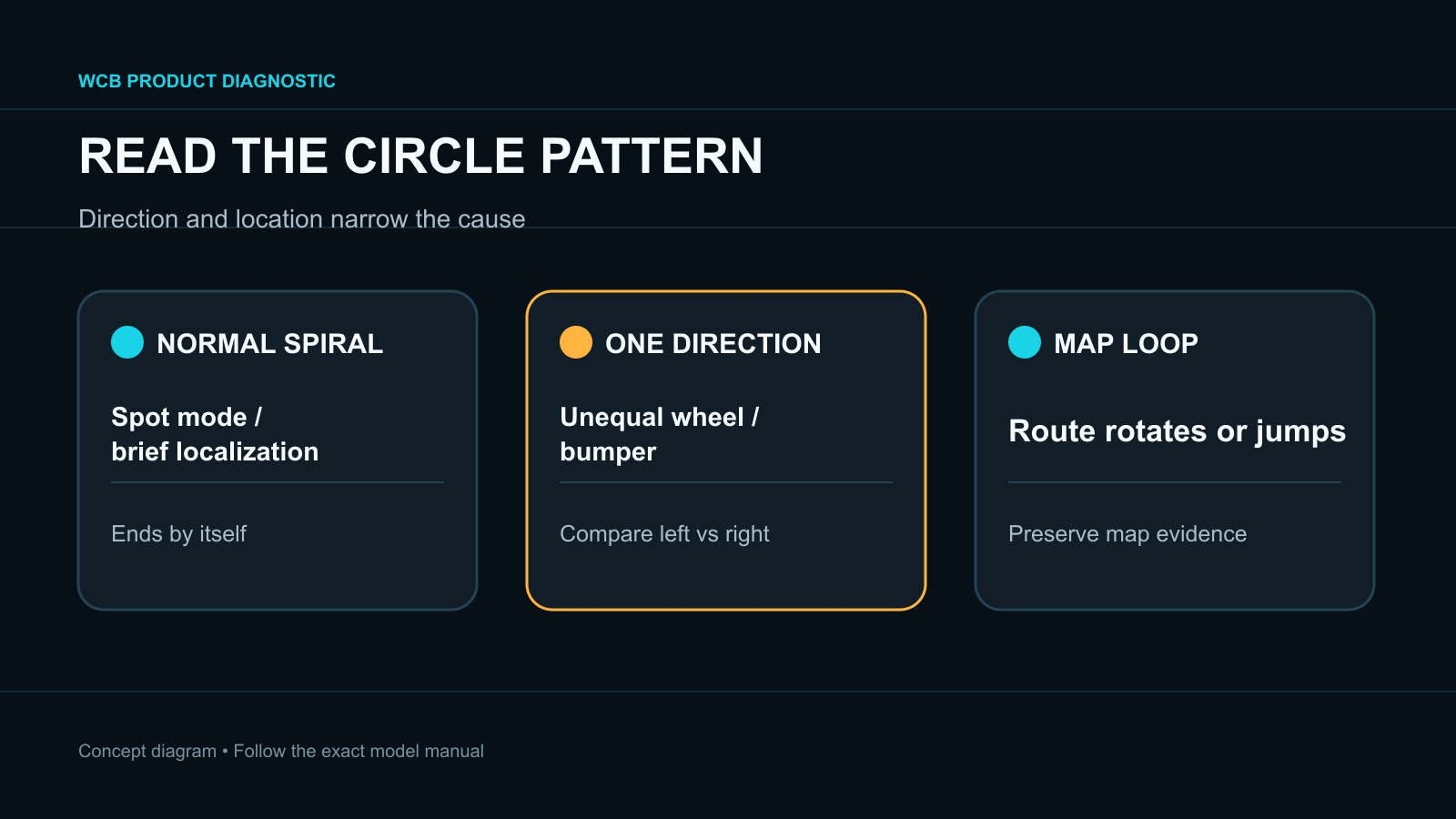
- First exclude normal spot-cleaning or localization turns and record whether the robot always circles in the same direction.
- A one-direction circle points first to unequal drive-wheel movement or a stuck bumper; random loops point more toward sensors, traction or localization.
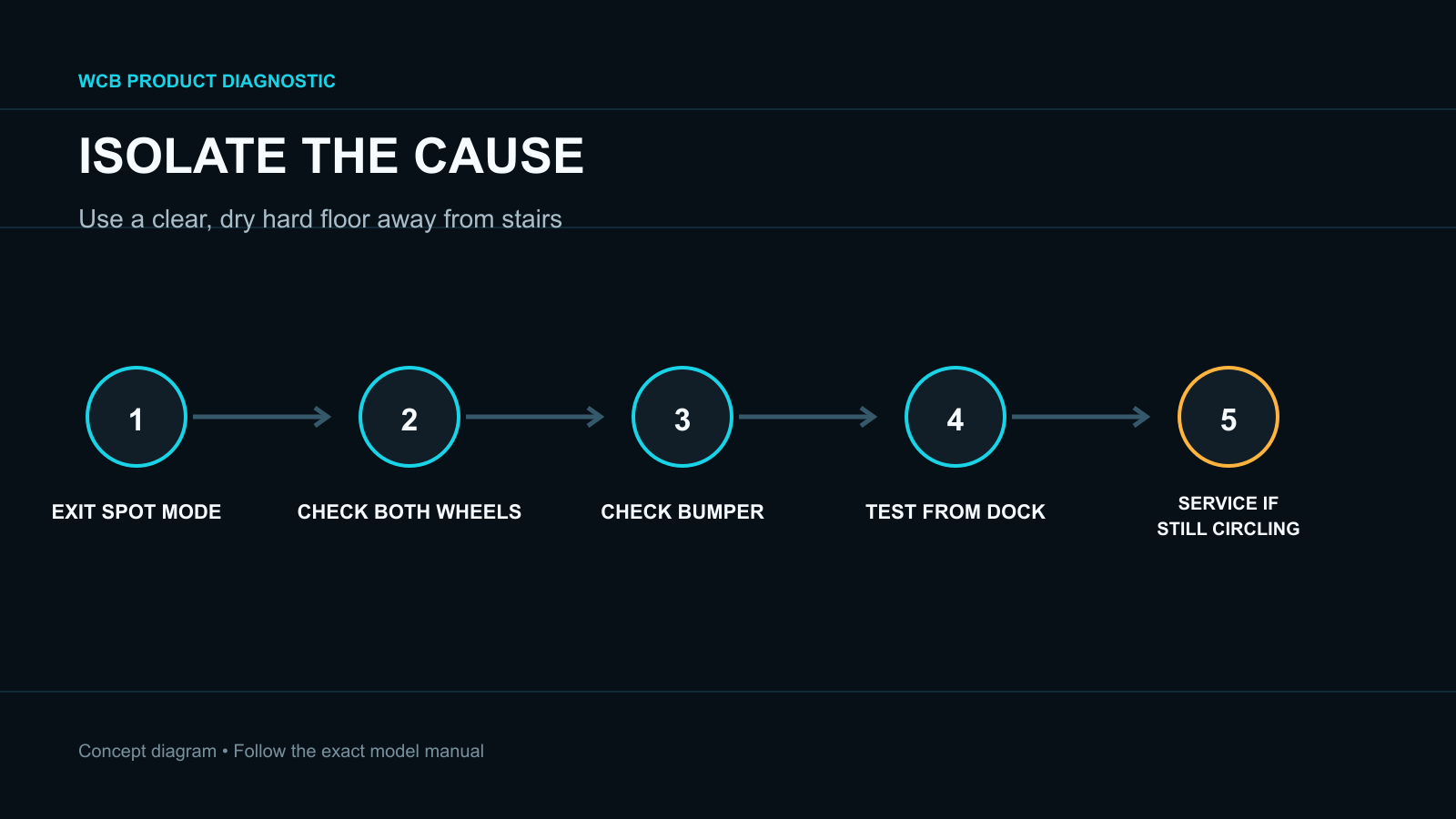
- Preserve the map before remapping, and use service when a clean wheel or bumper still behaves asymmetrically or the robot circles on clear hard floor.
In this article 12 sections
If your robot vacuum keeps going in circles, first confirm that it is not performing a normal spot-cleaning pattern or a brief localization turn. Persistent circles in one direction usually point first to unequal drive-wheel movement or a bumper that is not returning evenly. Wider random loops can follow dirty sensors, slippery flooring, wheel slip or a map/localization problem.
Record the direction, circle size, location, floor type, App route and any error before restarting. Do not delete the map until a short clear-floor test shows that the problem is actually related to localization.
Circling Patterns at a Glance
| What you observe | Leading area to check | First safe action |
|---|---|---|
| Tight circle in one direction | One drive wheel, wheel well or bumper side | Power off and compare left/right movement |
| Repeated arcs after collisions | Bumper movement or bumper sensor | Clean the accessible bumper and check symmetry |
| Circles only on one surface | Wheel slip, wet floor, dark rug or high pile | Move to clear dry hard floor |
| Brief circle at the start | Possible localization behavior | Compare with the exact manual before changing settings |
| Spiral during Spot mode | Normal programmed behavior on some models | Exit Spot mode and run a normal clean |
| Route rotates or jumps in the App | Localization or map mismatch | Preserve screenshots and test from the dock |
| Circles everywhere with no error | Wheel module, bumper, sensor or control fault | Run one isolation test, then use service if unchanged |
1. Exclude Normal Circular Behavior
Some robots deliberately move in a spiral during Spot cleaning. iRobot documents this behavior for several older Roomba series. Some LiDAR products also rotate briefly at startup to localize.
Check the App and buttons to confirm the active mode. A short, purposeful spiral that ends is not the same as uncontrolled circling throughout a normal room-cleaning mission.
Record a 20–30 second video. Note whether the robot always turns clockwise or counterclockwise, whether one wheel moves, and whether the bumper touched anything before the circle began.
2. Compare the Two Drive Wheels
To drive straight, the left and right wheels must produce compatible movement. Hair, thread or debris in one wheel well can create enough resistance to make the robot arc toward the slower side.
With the robot powered off, follow the manual to:
- remove visible debris around both drive wheels;
- press and release each wheel to compare spring return;
- turn each wheel only as the manufacturer allows;
- inspect tread for damage, contamination or uneven wear;
- clean the front caster and axle if it is user-removable.
eufy's official circling guidance specifically directs owners to compare the wheels and notes that a robot circling in one direction can be linked to a wheel or bumper problem. Left and right wheel modules may not be interchangeable.
Do not open the wheel module or disturb wiring unless the exact procedure identifies it as an owner replacement.
3. Check the Bumper
A compressed bumper or dirty bumper sensor can tell the robot that one side is continuously touching an obstacle. That false input can produce repeated turns or arcs.
Power off as instructed, remove visible dust around the accessible bumper gap and confirm that both sides return evenly without force. iRobot explains that dirty light-touch bumper sensors can reduce obstacle detection or make the robot behave as though obstructions are present.
If one side remains recessed, cracked or loose, stop repeated missions. The bumper or sensor may require service or a model-approved replacement.
4. Move to a Clear, Dry Hard Floor
Wet, polished or dusty flooring can cause unequal wheel slip. Thick or dark carpet can also change traction or sensor interpretation.
Choose an open hard-floor area away from stairs. Start a normal cleaning mission rather than Spot mode.
- Travels straight: the original surface, obstacle or transition is the leading cause.
- Circles in the same direction: focus on the slower wheel and bumper side.
- Moves straight but the App route rotates: focus on map or localization.
- Stops with a wheel or sensor error: preserve the exact error and follow that subsystem's procedure.
Do not perform this test on a table or cover cliff sensors.
5. Clean Approved Navigation Sensors
Follow the exact model instructions for cliff sensors, wall sensors, LiDAR windows or camera glass. Use only the specified dry or lightly damp method. Do not insert tools into sensor openings or spray cleaner directly on the robot.
Sensor contamination is more likely when circling changes by location or is accompanied by a map path that jumps. A consistent one-direction circle on every clear surface remains more suspicious for wheel or bumper asymmetry.
6. Preserve and Check the Map
Open the completed-job path. Look for a rotated robot icon, overlapping rooms, a map offset, repeated loops at one coordinate or a dock that appears in the wrong place.
Dreame separates lost, skewed, overlapping and incomplete maps into distinct support issues. That is a useful boundary: “circling” is a movement symptom, while a distorted map is evidence of localization trouble. Moving the robot or dock during a mission can also require repositioning.
Start one test from the dock without moving the robot. Preserve screenshots before restoring a backup or creating a new map. Remapping should follow evidence of map failure, not replace a mechanical wheel check.
7. Run One Final Isolation Test
After cleaning wheels, caster, bumper and approved sensors, restart the robot once and run a short normal clean on the same clear floor.
- If the robot now travels normally, monitor a full cycle and reintroduce the original area carefully.
- If it circles only after touching furniture, the bumper remains the leading area.
- If it circles immediately in one direction, a wheel or drive-control fault may remain.
- If the physical path is normal but the map path is wrong, follow model-specific map recovery.
Avoid repeated factory resets and long unattended tests.
When to Stop and Use Service
Use authorized service when one wheel cannot move or spring back normally, the bumper remains uneven, circling persists on a clear hard floor, a navigation sensor is physically damaged, the robot overheats or the repair requires opening the wheel, sensor or control enclosure.
Provide the model, serial number, firmware, circling direction, floor type, error, map screenshot and a short video from startup.
FAQ
Why does my robot vacuum spin in only one direction?
Unequal wheel movement or a bumper stuck on one side is the leading user-checkable cause. Clean and compare both wheels and bumper movement before remapping.
Is a spiral pattern normal?
It can be normal in Spot mode on some robots, and some models rotate briefly to localize. A continuous circle during a normal clean is different.
Can dark carpet make a robot vacuum circle?
Dark or unusual surfaces can affect some cliff or optical systems, while carpet can change wheel traction. Compare the same robot on a clear dry hard floor and never cover safety sensors.
Should I delete the map?
Only after preserving it and confirming visible map or localization errors. A wheel or bumper fault will not be repaired by remapping.
Why does the App path show circles when the robot looks normal?
The stored map, robot position or localization may be wrong. Start from the dock, avoid moving the robot during the job and use the exact model's map-recovery steps.
Final Answer
When a robot vacuum goes in circles, exclude Spot mode and brief localization turns, then record the direction and location. Power off the robot, compare both drive wheels, clean the caster and accessible bumper, and run a normal clean on clear dry hard floor.
Preserve the map before remapping. Persistent one-direction circling, an uneven bumper or wheel, or circling on every clear surface requires authorized service.